Operations manager
Finance controller
Compliance officer
Department head
VP of operations
Risk manager
Administrative lead
Process owner

Approval escalation is triggered when standard approval paths cannot complete within required timeframes, when request attributes exceed the authority of initial approvers, when exceptions or risks require senior judgment, or when organizational policy mandates additional oversight for certain decision types. The process applies when approvers are unavailable due to absence, workload, or other constraints, when values or risks cross thresholds requiring higher authority, or when audit and compliance requirements demand evidence that appropriate escalation occurred. It is common across all industries and functions where approval authority is delegated and oversight is required.
Approval escalation involves primary approvers whose unavailability or authority limits trigger escalation, backup or delegate approvers who step in when primaries cannot act, senior approvers or executives who handle escalated items exceeding standard authority, and administrative or operations teams who monitor escalation triggers and ensure timely routing. Compliance may review escalation patterns to ensure policy adherence.
Decisions made within required timeframes even when primary approvers are unavailable, ensuring processes do not stall. Appropriate authority for high-value or high-risk decisions routes items to approvers with proper delegation rather than allowing unauthorized approvals. Clear audit trail of escalation events documents why escalation occurred, who was notified, and how the decision was ultimately made. Reduced operational delays result from automatic escalation rather than manual intervention when approvals stall. Consistent policy enforcement ensures escalation rules apply uniformly rather than depending on individual judgment about when to escalate.
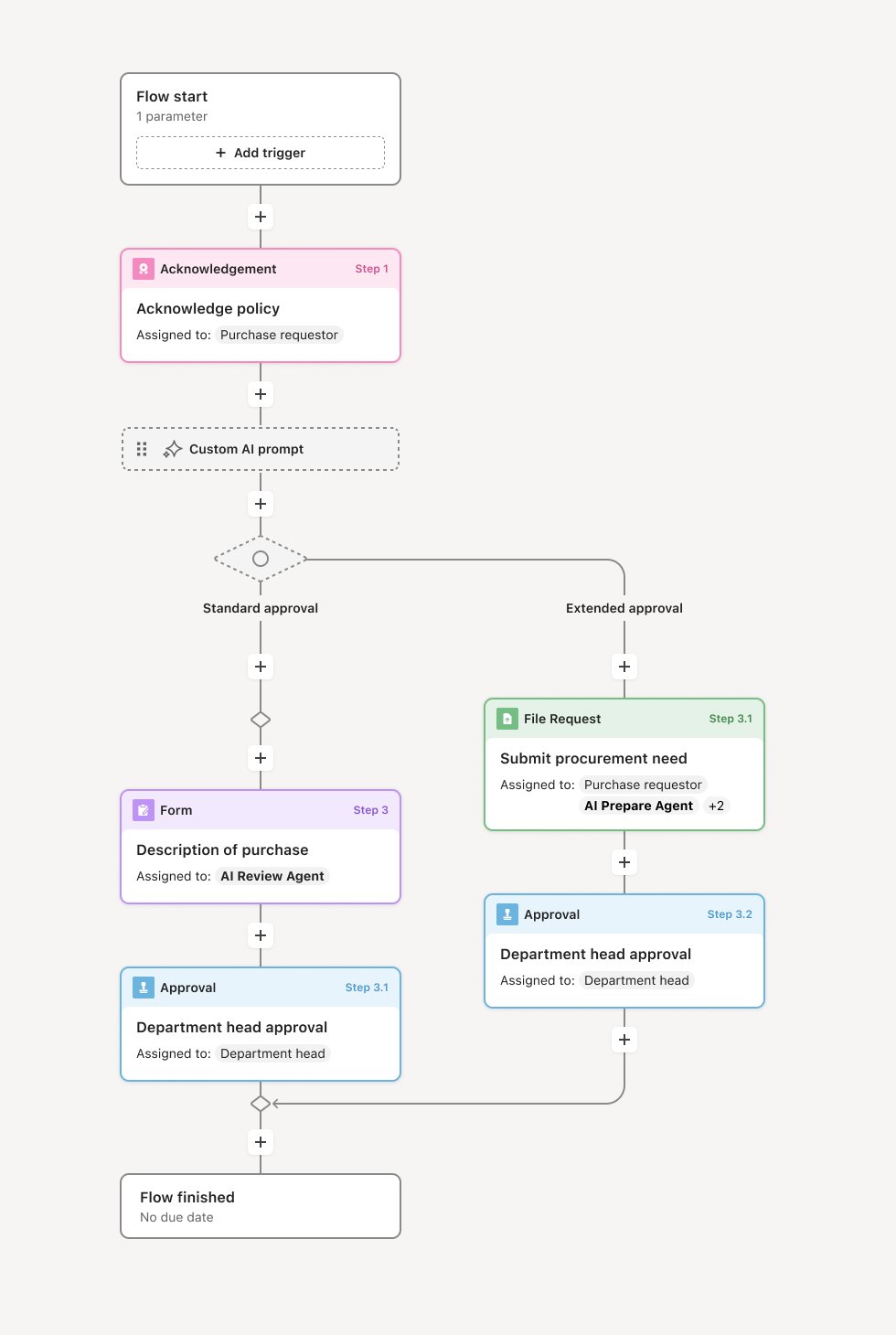
Your version of this process may vary based on roles, systems, data, and approval paths. Moxo's flow builder can be configured with AI agents, conditional branching, dynamic data references, and sophisticated logic to match how your organization runs this workflow. The steps below illustrate one example.
Initial approval attempt
The process begins with a standard approval request routed to the designated approver based on request type, value, and organizational rules. The approver receives the request with full context and is expected to decide within defined timeframes. The workflow tracks time elapsed and monitors for action.
Escalation trigger evaluation
If the primary approver does not act within configured thresholds, or if the request attributes meet escalation criteria from the start, the workflow evaluates escalation rules. Time-based triggers activate when items age beyond acceptable limits. Attribute-based triggers activate when values, risks, or exception flags exceed the primary approver's authority. The workflow determines the appropriate escalation path based on configured rules.
Escalation notification and routing
The workflow notifies the escalation recipient with clear context: what is being escalated, why escalation was triggered, the original request details, and any action taken to date. The escalation recipient may be a backup approver, manager of the primary approver, senior executive, or specialized reviewer depending on escalation type. The original approver is notified that escalation has occurred.
Escalated review and decision
The escalation recipient reviews the request with full context and decides to approve, reject, return for additional information, or further escalate if the item still exceeds their authority. AI agents may assist by summarizing the request, highlighting why escalation was triggered, and preparing relevant context. If the escalation recipient acts, the decision is captured with full traceability.
Resolution and record capture
Once a decision is made, the workflow records the complete escalation history: who the original approver was, why escalation occurred, who received the escalation, and how the decision was made. The requester is notified of the outcome. The approval proceeds or is rejected based on the decision.
Pattern monitoring and policy feedback
Escalation events are tracked and reported to identify patterns. Frequent escalations for specific approvers, request types, or thresholds may indicate capacity issues, policy misalignment, or process improvement opportunities. Escalation data feeds back into approval management and workflow design.
This process commonly relies on inputs such as approval request data, approver availability status, escalation thresholds and rules, organizational hierarchy information, and delegation policies. It is triggered by time elapsed without action or by request attributes meeting escalation criteria. Supporting systems include any platform where approvals occur, along with calendar or availability systems that indicate approver status.
Key decision points include determining when time-based escalation should trigger, whether request attributes meet escalation thresholds at submission, who should receive the escalation based on type and organizational structure, and whether the escalation recipient has authority or must further escalate.
Escalations triggered too late, allowing delays to compound before senior attention is engaged. Insufficient context provided to escalation recipients, requiring them to investigate before deciding. Unclear escalation authority, causing confusion about who can make the escalated decision. No notification to original approvers, creating confusion about request status. Escalation patterns not monitored, missing opportunities to address root causes of frequent escalation.
Embeds escalation logic directly in workflows so time-based and attribute-based triggers activate automatically without manual intervention.
Routes escalations to appropriate recipients based on configured rules ensuring decisions reach parties with proper authority.
AI agents prepare escalation context by summarizing requests, highlighting escalation reasons, and attaching relevant history so recipients can act immediately.
Notifies all parties of escalation events keeping original approvers and requesters informed of status changes.
Maintains complete escalation audit trails documenting triggers, routing, and decisions for compliance and process review.
Surfaces escalation patterns in reporting to identify root causes and opportunities for process improvement.