Operations manager
Compliance officer
Finance manager
Department head
Program manager
Legal operations lead

When business decisions, documents, or requests require formal authorization before proceeding. When risk, compliance, or financial thresholds demand review by specific stakeholders. When multiple approvers must coordinate sequentially or in parallel across departments. Ideal for finance, legal, operations, HR, and compliance-driven organizations.
Requesters initiate the approval by submitting information or documents. Reviewers assess submissions against criteria and either approve, reject, or request changes. Approvers provide formal authorization at defined decision points. Escalation owners handle exceptions or delays. Operations coordinators monitor progress and ensure steps complete on time.
Faster approval cycles by routing requests directly to the right decision-makers with complete context Clear audit trail documenting who approved what, when, and under what conditions Reduced bottlenecks through parallel approvals and automated escalation when deadlines approach Consistent decision criteria applied across all requests through structured review steps
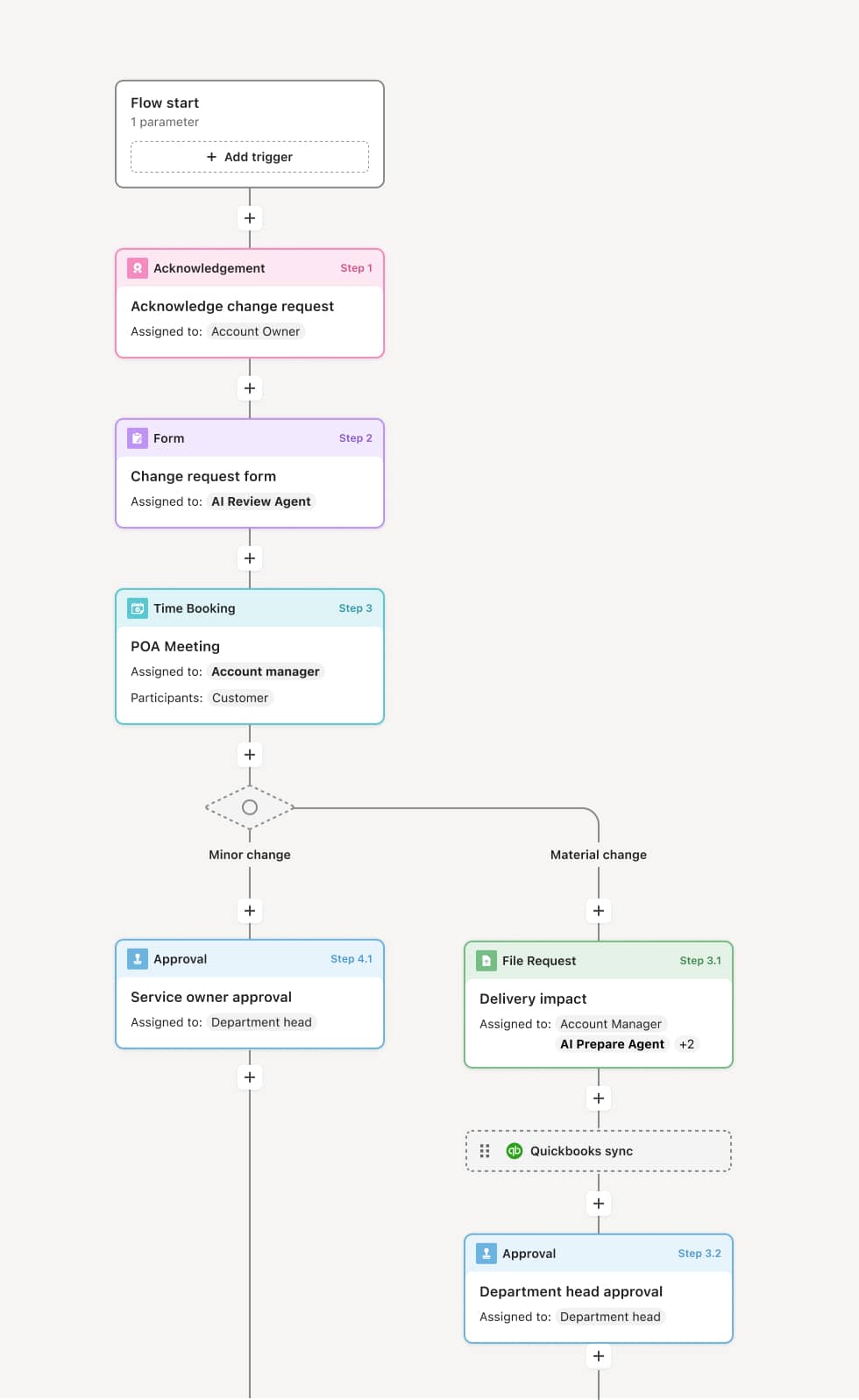
Your version of this process may vary based on roles, systems, data, and approval paths. Moxo's flow builder can be configured with AI agents, conditional branching, dynamic data references, and sophisticated logic to match how your organization runs this workflow. The steps below illustrate one example.
Request initiation
The process begins when a requester submits information, documents, or a formal request for approval. An AI agent may validate completeness, flag missing fields, or pre-populate data from connected systems before routing to reviewers.
Initial review and validation
The submission is routed to an initial reviewer who assesses whether criteria are met. If information is incomplete or requires clarification, the workflow returns the request to the requester with specific guidance. If requirements are satisfied, the request advances to formal approval.
Approval decision
Designated approvers review the request in context, with all supporting materials attached. Approvers may approve, reject, or request modifications. If the request exceeds defined thresholds, conditional logic routes it to additional approvers or escalates to senior decision-makers.
Parallel or sequential authorization
Depending on organizational policy, multiple approvers may act in parallel or in a defined sequence. The workflow tracks each authorization and only advances once all required approvals are captured. If any approver rejects, the process branches to a resolution path.
Completion and notification
Once all approvals are secured, the process records the outcome, timestamps the decision, and notifies all relevant stakeholders. Final artifacts are stored in the workflow record, and downstream actions such as system updates or document generation may be triggered automatically.
This process commonly relies on inputs such as request forms, supporting documents, policy criteria, and data from connected systems. Triggers may include form submissions, system events from platforms like Salesforce, Workday, or NetSuite, or direct start links. Integration with ERP, HRIS, or CRM systems ensures approvers have real-time context.
Key decision points include determining whether the submission meets approval criteria, whether the request exceeds authority thresholds requiring escalation, and whether exceptions warrant additional review or rejection.
Requests stalled because the wrong approver was assigned or unavailable. Missing context forcing approvers to seek clarification outside the workflow. Unclear escalation paths when approvers fail to act within expected timeframes. Inconsistent criteria applied across similar requests due to lack of standardization.
Orchestrates approvals across internal teams and external stakeholders ensuring each participant sees only what they need to act
Routes requests to the right approvers based on thresholds, roles, or conditions with automatic escalation when deadlines approach
AI agents validate submissions for completeness and prepare approval actions with relevant context attached
Maintains a complete audit trail of every decision, timestamp, and participant for compliance and reporting