Operations manager
Finance director
Procurement lead
IT operations manager
Compliance manager
Revenue operations lead

When requests must be directed to different approvers based on value, risk, or category. When approval authority varies by role, department, or geographic region. When dynamic conditions determine whether single or multi-level approval is required. Ideal for procurement, finance, HR, and IT organizations with tiered approval structures.
Requesters submit items for approval. Routing logic evaluates criteria to determine the appropriate approver or approval chain. Approvers at various authority levels review and authorize based on their delegation limits. Operations teams configure and maintain routing rules. Escalation owners handle exceptions when routing fails or approvers are unavailable.
Accurate approver assignment every time, eliminating manual routing decisions and delays Reduced approval cycle time by sending requests directly to the right authority level Enforced delegation policies ensuring requests stay within authorized limits Clear visibility into routing logic for audit and compliance purposes
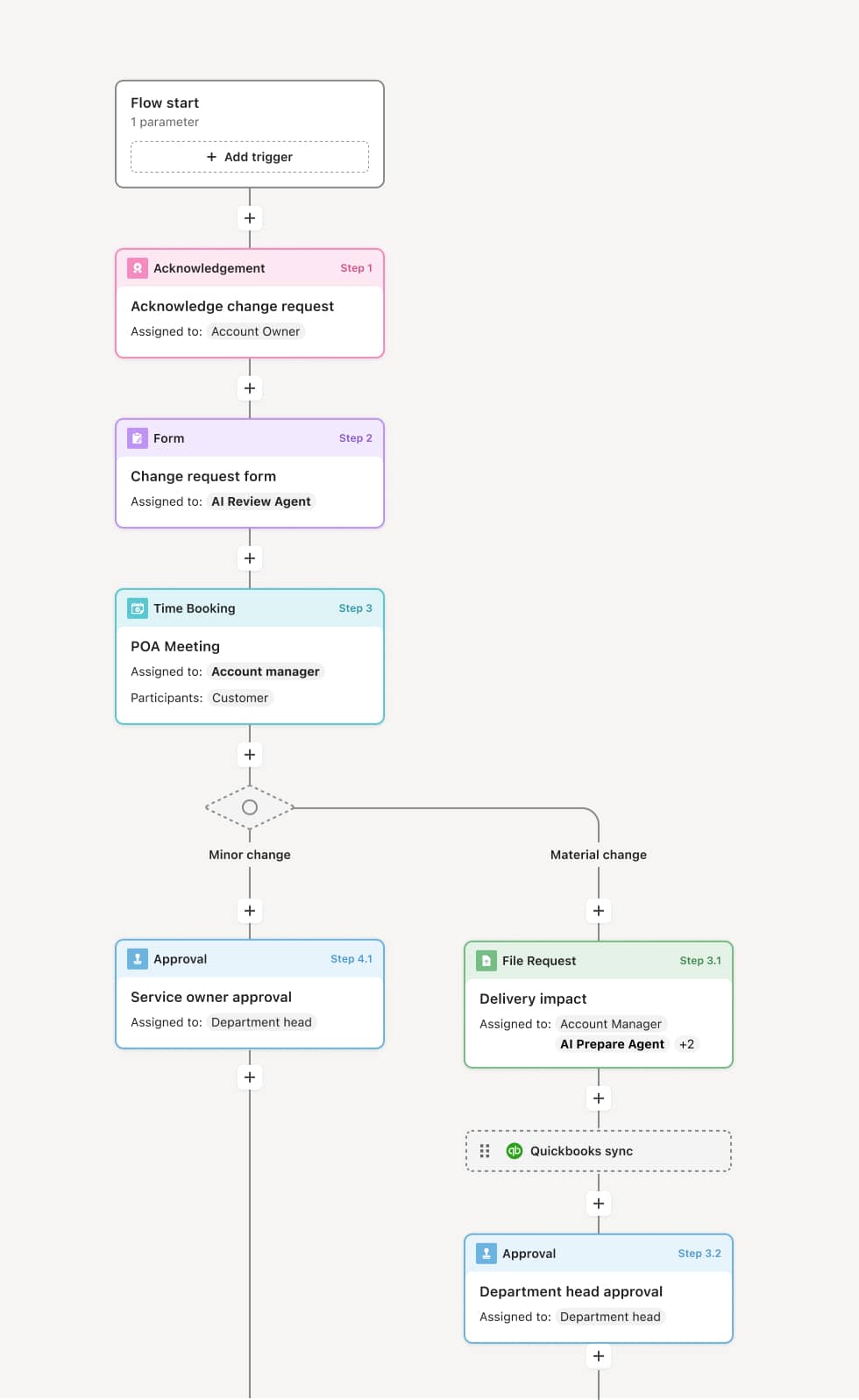
Your version of this process may vary based on roles, systems, data, and approval paths. Moxo's flow builder can be configured with AI agents, conditional branching, dynamic data references, and sophisticated logic to match how your organization runs this workflow. The steps below illustrate one example.
Request submission and data capture
The process begins when a request is submitted with attributes that determine routing, such as amount, category, department, or risk classification. An AI agent may validate inputs and flag missing data before routing logic evaluates the request.
Routing evaluation
Configured rules evaluate request attributes against approval thresholds and policies. The workflow determines whether the request requires single approval, parallel approvals, or a sequential approval chain. If conditions are ambiguous, the request may be routed to a triage queue for manual assignment.
Approver assignment
Based on evaluation results, the workflow assigns the request to specific approvers. If the primary approver is unavailable, delegation rules may route to an alternate. Notifications are sent with full context so approvers can act immediately.
Approval or escalation
Approvers review and authorize, reject, or request changes. If a request exceeds the current approver's authority, the workflow automatically escalates to the next tier. If approvers fail to act within defined timeframes, reminders are sent and escalation paths activate.
Completion and logging
Once routing completes and all required approvals are captured, the outcome is recorded with full traceability. The routing path, each approver's action, and timestamps are preserved for audit purposes.
This process relies on request attributes, approval matrices, delegation tables, and threshold configurations. It may be triggered by form submissions, system events, or upstream workflow completions. Integration with systems like Workday, SAP, or Coupa provides real-time data for routing decisions.
Key decision points include determining which approval tier applies based on request value or risk, whether delegation rules should route to alternates, and whether manual triage is required for edge cases.
Outdated approval matrices causing requests to route to the wrong person. Missing delegation rules when primary approvers are unavailable. Routing loops when conditions are misconfigured. Lack of visibility into why a request was routed to a particular approver.
Configures routing logic based on thresholds, roles, and conditions within the flow builder
AI agents validate request data and flag potential routing issues before assignment
Automates escalation when approvers fail to act within defined timeframes
Provides full visibility into routing decisions and approval paths for compliance and audit