


Table of Contents
Getting a request approved is still agonizingly slow in most organizations: email chains, misplaced forms, week-long waits for a signature that takes four seconds to give. The tooling era fixed some of that. The agent era changes the question entirely, because AI can now do the legwork around an approval: assemble the context, validate the numbers, flag the exceptions, chase the stragglers, even weigh the request and recommend the call. The one thing it can't do is sign. Approvals are where accountability lives, and accountability stays human.
That makes approval software the sharpest test of any workflow platform: how well does it divide the work between the agents that prepare and the people who decide? We ranked ten tools on exactly that question, alongside the fundamentals: routing, visibility, audit trails, and price. Moxo takes #1 because human sign-off is its architecture, not a feature. Prices and ratings are current as of August 2026.
The challenges with manual approval workflows
Manual approval processes create a host of hurdles that get in the way of productive collaboration and timely decision-making. Here are the most significant issues:
- Slow decision-making: Approvals tend to get stuck in email inboxes or piled on a manager's desk. If the crucial approver is unavailable, the process halts, wasting opportunities and stalling projects.
- Vulnerability to human error: When individuals manually pass documents around, mistakes inevitably creep in. The wrong figures may be endorsed, vital attachments might be missing, or deadlines slip unnoticed.
- Lack of transparency: In a disorganized, ad-hoc system, employees have no reliable way to see which approvals are complete or pending. Managers have trouble pinpointing where approvals get stuck, and employees remain in the dark about their requests.
- Compliance and security risks: Many industries, including healthcare, finance, and law, have stringent regulatory demands. Under an informal approval approach, unauthorized signatures might slip through, sensitive files could be compromised, and mandatory reviews might be skipped.
Given these pitfalls, more organizations are adopting approval workflow software to modernize and tighten their procedures. By going digital, they replace the email shuffle with a structured flow that automatically directs tasks to the correct stakeholders.
What is an approval workflow
An approval workflow is a set of steps that a request or document follows to be reviewed and signed off by authorized participants. It might start with someone submitting a form or uploading a draft, which triggers a series of approvals. The item transitions methodically from one approver to the next until the entire chain is satisfied.
Manually, these workflows are cumbersome. A single budget request can bounce around for days in someone's inbox. Most teams start by tightening the wording of the ask itself (our request for approval email templates exist for exactly that stage) and by mapping who signs what with an approval matrix. Software is what makes both stick: notifications go out immediately, tasks reach the right individuals, and every action is recorded. That automation provides several benefits:
- Faster turnaround and efficiency: Automated sequences and notifications mean employees no longer waste time searching for lost emails. The system nudges users when their review is due, cutting delays and rework.
- Enhanced collaboration and visibility: Users see exactly which stage an approval is in, who is reviewing it, and what feedback was given. Comments stay within the workflow tool, so conversation threads remain with the item itself.
- Audit trail and accountability: Each step is automatically logged with timestamps, user IDs, and comments. No more guesswork about who approved what and when. In regulated fields, these logs are vital for compliance.
- Security and compliance: With well-defined approval paths, you control who can see or sign off on sensitive documents, and the system can require multiple signatures for specific thresholds.
The four kinds of approval software
Process platforms with external approvers: Moxo. Approvals that cross the company boundary: clients countersigning engagements, vendors acknowledging terms, with AI agents preparing each packet.
Finance-specific approval tools: ApprovalMax. Bills, purchase orders, and expenses routed over your accounting stack.
Work management with approvals built in: Wrike, Asana, monday.com. Sign-offs attached to tasks and projects your team already runs.
Process builders and specialists: Kissflow and Process Street (business process platforms), Power Automate (IT-led automation), Jotform (form-driven), Ziflow (creative proofing).
| Tool | Best for | Starting price (Aug 2026) |
|---|---|---|
| Moxo | AI workflow automation for approvals | Trial on request; team + enterprise plans |
| ApprovalMax | Finance approvals on Xero/QuickBooks | From $59.40/mo |
| Wrike | Approvals inside project work | Free; paid from $10/user/mo |
| Kissflow | Enterprise process platform | From $1,500/mo |
| Power Automate | IT-led approval automation in Microsoft 365 | From $15/user/mo |
| Jotform | Form-triggered approvals | Free; paid from $39/mo |
| Ziflow | Creative and asset proofing | Free plan; paid from about $199/mo |
| Process Street | Checklist-driven process approvals | Pricing on request |
| Asana | Task approvals for internal teams | Free; paid from about $10.99/seat/mo |
| monday.com | Approvals on flexible work boards | Free; paid from about $12/seat/mo |
1. Moxo: best for running approvals inside the process
What it is. The AI workflow automation platform for approvals. In Moxo, an approval isn't a standalone task; it's a step inside the process it governs, with everything the approver needs attached: the documents, the form data, the conversation, and the AI-prepared context.
How it works. You design the flow once: human roles, AI agents, approval checkpoints, escalation rules. From then on, the process runs itself: requests route to the named approver, escalation rules cover absences, and agents chase the stragglers so your team doesn't have to.
Agents do the legwork, and advise on the call. This is the part that changes the job. Before an approval ever reaches a person, agents have already done the hours: a pre-filler agent assembles the packet from prior steps, a reviewer agent checks the submission for completeness and consistency, and an advisor agent analyzes the request against your policies, thresholds, and history, then attaches a recommendation: approve, reject, or escalate, with the reasoning and evidence laid out beside it. The approver isn't starting from a blank page; they're pressure-testing a prepared position. One clean decision instead of an afternoon of assembly, and the record shows exactly what they saw when they made it.
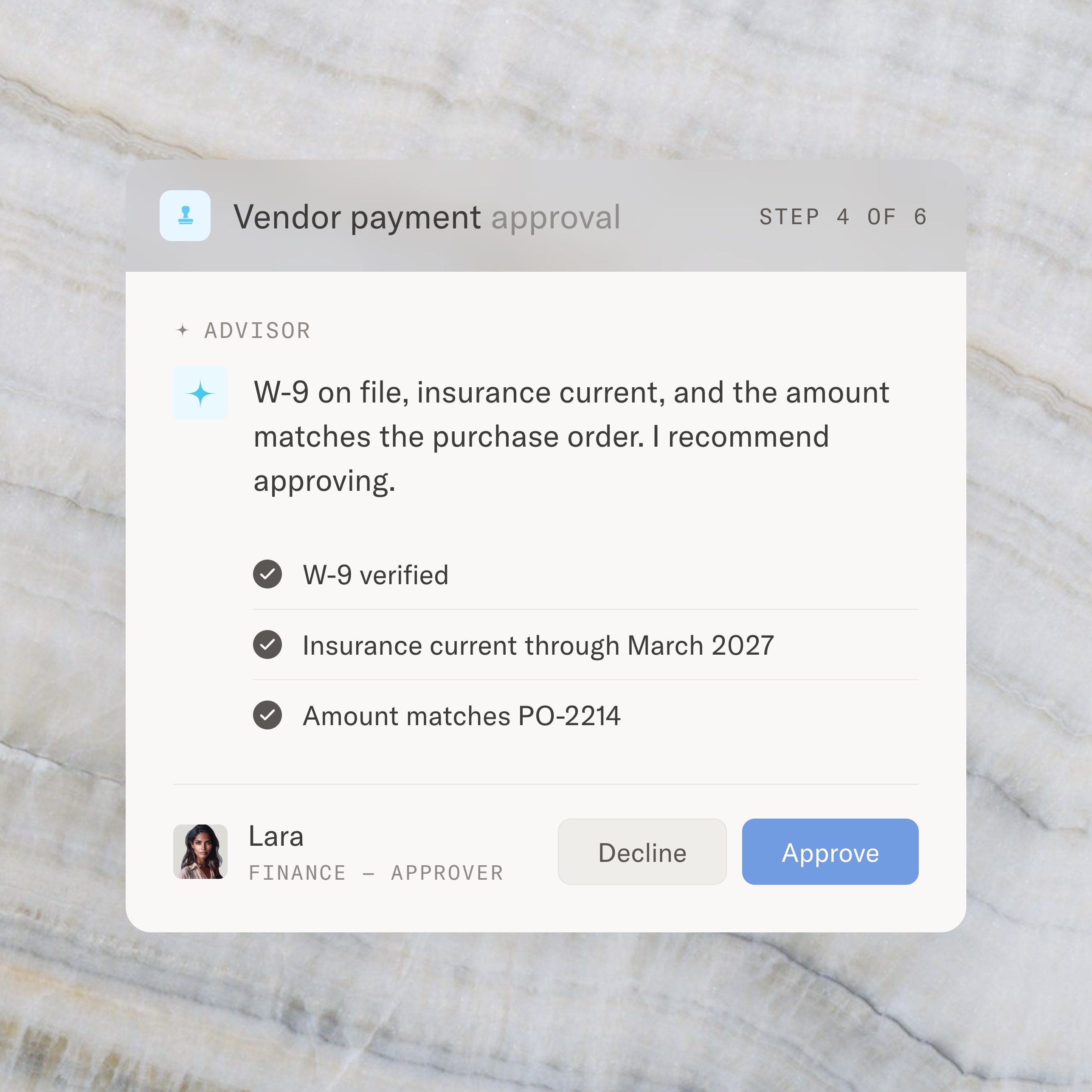
Where the sign-off stays human. Automation steps that write to outside systems carry an approve-before-it-runs option: the payment, the record update, the client-facing message pauses for a named person first. That's the structural difference between an approval feature and approval architecture. An agent can prepare a decision; it cannot own one. Regulators, auditors, and clients hold people accountable, and Moxo is built on that assumption.
External approvers, no accounts. The approval most tools can't handle is the one outside your company: the client countersigning a scope change, the vendor acknowledging terms. In Moxo, external approvers join through a branded portal or a magic link, no accounts and no downloads, and their sign-off lands in the same audit trail as everyone else's. Here's how a document approval workflow runs end to end.
Best for. Ops, finance, and compliance teams running approvals with consequence: engagement sign-offs, lending decisions, vendor onboarding, contract reviews.
Pricing. Team and enterprise plans, with trials on request; current tiers at moxo.com/book-demo. G2 rating: 4.5 (194 reviews) as of August 12, 2026.
Who it's for. Moxo earns its keep where approvals carry weight and cross boundaries. If you need a lightweight yes/no on internal tasks, a work management tool below fits lighter.
Where Moxo is different. Every tool on this list can route a request to a person. Moxo is the only one where AI agents and human approvers are both first-class participants in the same flow: agents prepare, validate, advise, and chase; people decide; and one audit trail proves who approved what, when, and with what information in front of them. Start today: request a trial at moxo.com/get-started and have your first approval flow, agents included, running this week.
2. ApprovalMax: best for finance approvals
What it is. ApprovalMax builds purpose-made approval workflows for bills, purchase orders, and expenses over Xero and QuickBooks Online: multi-step approval matrices, separation of duties that reduces fraud risk, and audit reports your accountant will actually like.
Best for. Finance teams that want accounts-payable approvals out of email without changing their accounting stack.
Pricing. From $59.40/month. G2 rating: 4.6 (44 reviews) as of August 13, 2026.
Cons. Scoped to the finance stack; it's not a general process tool.
3. Wrike: best for approvals inside project work
What it is. Wrike is project management with real approval machinery: sequential and parallel approval chains, dynamic request forms that capture the details upfront, and in-platform proofing so stakeholders annotate assets directly.
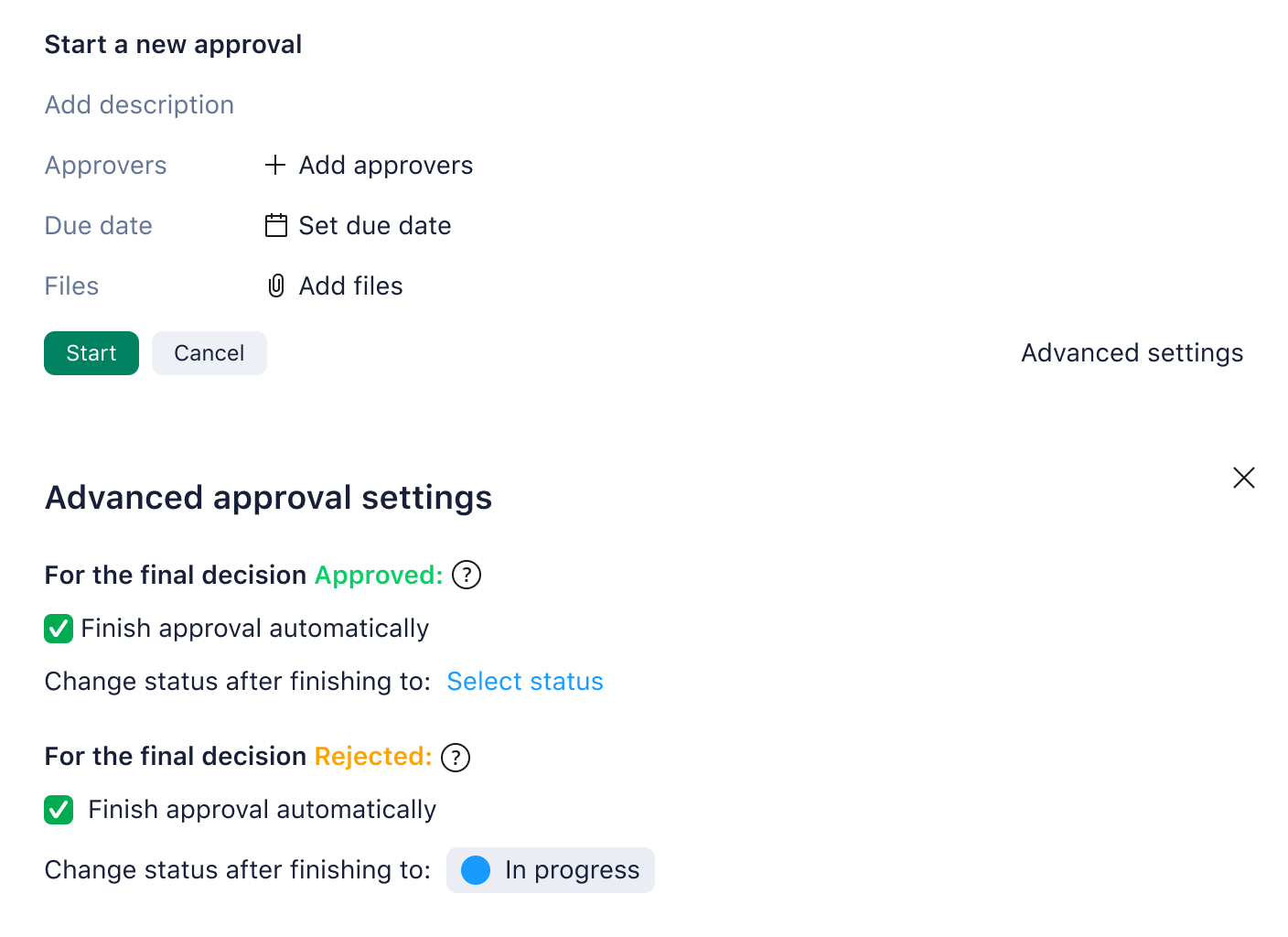
Best for. Teams that want approvals living inside the same tool that plans and tracks the work.
Pricing. Free plan; paid from $10/user/month. G2 rating: 4.2 (4,520 reviews) as of August 13, 2026.
Cons. SSO and two-factor authentication are gated to the enterprise tier, and approvals live inside Wrike's project world; external sign-off isn't the model.
4. Kissflow: best enterprise process platform
What it is. Kissflow is a low-code platform where approvals are one pattern among many: procurement, onboarding, custom internal apps, all governed in one place.
Best for. Ops or IT groups standardizing dozens of internal processes on one platform.
Pricing. From $1,500/month. G2 rating: 4.3 (590 reviews) as of August 13, 2026.
Cons. The entry price rules out small teams, and external participants aren't the model.
5. Power Automate: best for IT-led approvals in Microsoft 365
What it is. Microsoft Power Automate runs approvals as flows over Teams, SharePoint, and Dynamics: unbeatable when the work already lives in your Microsoft tenant, with deep triggers and system integration.
Best for. Organizations whose approvals are internal and whose IT team owns the automation estate.
Pricing. From $15/user/month. G2 rating: 4.4 (911 reviews) as of August 12, 2026.
Cons. Business users struggle to build or adjust flows without IT support, and it's designed for internal back-office processes rather than client-facing approvals.
6. Jotform: best form-triggered approvals
What it is. Jotform extends its form builder into approval workflows: a submitted form kicks off the chain, and drag-and-drop conditions route by amount, type, or department. The fastest cheap start in the category.
Best for. Small teams automating request-driven approvals: PTO, IT tickets, invoice sign-offs.
Pricing. Free; paid from $39/month. G2 rating: 4.6 (8,373 reviews across Jotform products) as of August 13, 2026.
Cons. One approval flow per form, and usage caps tied to form counts surprise growing teams.
7. Ziflow: best creative and asset proofing
What it is. Ziflow specializes in creative approvals: frame-accurate annotation on video, banners, and PDFs, version comparison, and staged review loops from marketing to compliance to the executive sponsor.
Best for. Marketing and creative teams centralizing feedback on multimedia assets.
Pricing. Free plan; paid from about $199/month. G2 rating: 4.5 (934 reviews) as of August 13, 2026.
Cons. Specialized to assets rather than business processes, and reviewers report onboarding takes training.
8. Process Street: best checklist-driven approvals
What it is. Process Street turns recurring processes into checklists with approval steps and conditional logic built in: strong for SOP-heavy operations teams that live by their runbooks.
Best for. Operations teams whose approvals sit inside repeatable, documented procedures.
Pricing. Pricing on request. G2 rating: 4.6 (460 reviews) as of August 13, 2026.
Cons. Pricing is sales-gated, and complex conditional logic has a real learning curve.
9. Asana: best task approvals for internal teams
What it is. Asana offers approval-type tasks, intake forms, and routing rules inside the work management tool many teams already run, so sign-offs attach to the work itself.
Best for. Teams already on Asana that want lightweight internal approvals without another tool.
Pricing. Free; paid from about $10.99/seat/month. G2 rating: 4.4 (13,741 reviews across Asana products) as of August 12, 2026.
Cons. Approvers need seats, and external sign-off isn't the model.
10. monday.com: best approvals on flexible boards
What it is. monday.com handles approvals through status columns and automation recipes on boards teams shape to any process, from campaign sign-off to purchase requests.
Best for. Teams that want approvals embedded in boards they design themselves.
Pricing. Free; paid from about $12/seat/month. G2 rating: 4.7 (14,955 reviews for monday Work Management) as of August 12, 2026.
Cons. Approval rigor is what you build; governance is light out of the box.
Features to look for in scalable approval workflow software
Not all approval workflow solutions are created equal. When selecting approval software for your organization, pay attention to features that guarantee you can handle higher volumes and more complex processes over time:
- AI preparation, human decision: The 2026 test. Can agents assemble the packet, validate the inputs, and chase the laggards while the decision itself stays with a named person? Tools that only automate routing leave the assembly work on your desk.
- User-friendly, no-code builder: A visually guided setup helps non-technical personnel configure or update approval workflows without IT bottlenecks.
- Dynamic forms and data capture: Your software should include a form builder or integrate seamlessly with one, so every approval arrives with standardized, complete inputs.
- Robust security and role-based access: A scalable solution must handle complex permission structures, ensuring only authorized individuals can approve, view, or edit certain requests.
- Deep integrations: The tool should sync with the systems you already use, like project management, CRM, or storage tools, through native integrations, APIs, or webhooks.
- Analytics and reporting: To refine your workflows, you need data on approval durations, rejection rates, and which steps cause holdups.
- Automated notifications and reminders: A strong tool notifies approvers automatically and escalates when deadlines loom, so approvals never get lost in busy schedules.
Which approval software is best?
Moxo is the best approval software for teams whose approvals carry consequence, and it holds #1 here because it's the only platform where agents do the legwork, advise on the call, and a named person owns the decision, inside one governed flow. The right pick depends on your situation:
Your approvals have stakes and cross company lines (engagements, lending, vendors): Moxo.
Your approvals are bills and purchase orders: ApprovalMax over your accounting stack.
Your approvals live inside project work: Wrike, or Asana and monday.com if you're already there.
Your company lives in Microsoft: Power Automate.
Your approvals start with a form: Jotform.
Your approvals are creative assets: Ziflow.
For creative pipelines specifically, our marketing approval workflow guide goes deeper. And if you're mapping where approvals fit in the wider agent era, start with our tested review of the 16 best agentic AI tools.
Conclusion
Automated approvals turn cumbersome processes into transparent workflows that reduce bottlenecks and eliminate the chase. The 2026 shift is bigger than routing: agents now prepare the packet, validate the inputs, and recommend the call, so the person who signs spends their time on judgment instead of assembly. From the first request for approval to the final sign-off, the platforms that win are the ones that divide that labor cleanly. Moxo is built on exactly that division. Request a trial and see your first approval flow run this week.
FAQs
What types of approval processes can be automated with workflow approval tools?
Almost any regularly repeated process requiring sign-off can be digitized. Common use cases range from finance (invoices, purchase orders) and HR (vacation requests, expense approvals) to marketing (content reviews) and beyond. Automation adapts to simple or highly nuanced workflows, ensuring no step is skipped and every stakeholder is properly informed.
Can AI approve things automatically?
No, and it shouldn't. What AI agents do is everything around the decision: assemble the context, validate the data, flag exceptions, chase responses, and even recommend the call with the reasoning attached. The decision itself belongs to a named person, because accountability is what an approval is. Look for platforms where that division of labor is structural.
How does approval workflow software help with compliance and audits?
By enforcing a defined sequence of steps and permissions, approval software ensures unauthorized reviews don't slip through and every action is logged. Each approval, rejection, or comment is captured with a timestamp, user information, and relevant attachments.
What's the difference between approval software and workflow automation?
Approval software is workflow automation with judgment checkpoints built in. General automation moves work between systems; approval software adds the structure around human decisions: who signs, in what order, with what information, and what happens on a yes or a no. The best platforms now combine both, with AI agents running the automation and named people holding the checkpoints.
Can small businesses benefit from approval workflow software?
Yes. Even with a modest team, tracking approvals via email chains or spreadsheets gets confusing fast. An approval workflow tool cuts wasted effort while projecting a polished, professional image to clients.
How do these approval workflow tools integrate with the software we already use?
Most leading platforms offer native integrations with popular apps like Slack, Microsoft Teams, Google Drive, or DocuSign, plus open APIs and connector services for less common systems. A typical setup pulls the relevant file from cloud storage, routes it for sign-offs, and places the approved version back automatically.
What is the best way to implement an approval workflow system without disrupting our team?
Start small, choosing a single pain point to automate, like invoice approvals. Involve relevant stakeholders, give a short training, and run the new and old approaches in parallel until everyone is comfortable. Once a pilot succeeds, expand to other processes and highlight measurable wins to encourage broader adoption.
