Quality assurance manager
Field inspection lead
Compliance officer
Operations manager
Facilities director
Safety manager

This process is used when an inspection has been completed and the findings require formal review and approval before an asset, facility, product, or process can be cleared for use, occupancy, shipment, or continuation. It is triggered when a scheduled or ad-hoc inspection is completed, when regulatory requirements mandate formal inspection sign-off, or when inspection findings include non-conformances that require evaluation. It applies when the inspection outcome affects operational readiness, safety, regulatory compliance, or quality certification. This process is common in construction, manufacturing, healthcare, food and beverage, energy, and any industry where inspection results must be formally approved before work continues.
The inspection approval process typically involves field inspectors or auditors who conduct the inspection and document findings, quality reviewers who evaluate the findings against standards and specifications, compliance officers who assess regulatory implications of the inspection results, operations managers who determine the operational impact of the approval decision, and senior quality or operations leaders who authorize conditional acceptances or waive non-critical findings.
Reliable operational clearance because every inspection is formally reviewed and approved before the next stage proceeds. Consistent evaluation standards applied to all inspection findings regardless of the inspector, location, or asset type. Faster clearance for passing inspections by automating the routing of clean inspection results directly to the approver. Structured handling of non-conformances with documented corrective action paths and re-inspection requirements. Regulatory confidence with a complete record of inspection findings, reviewer evaluations, and approval decisions for every inspected item.
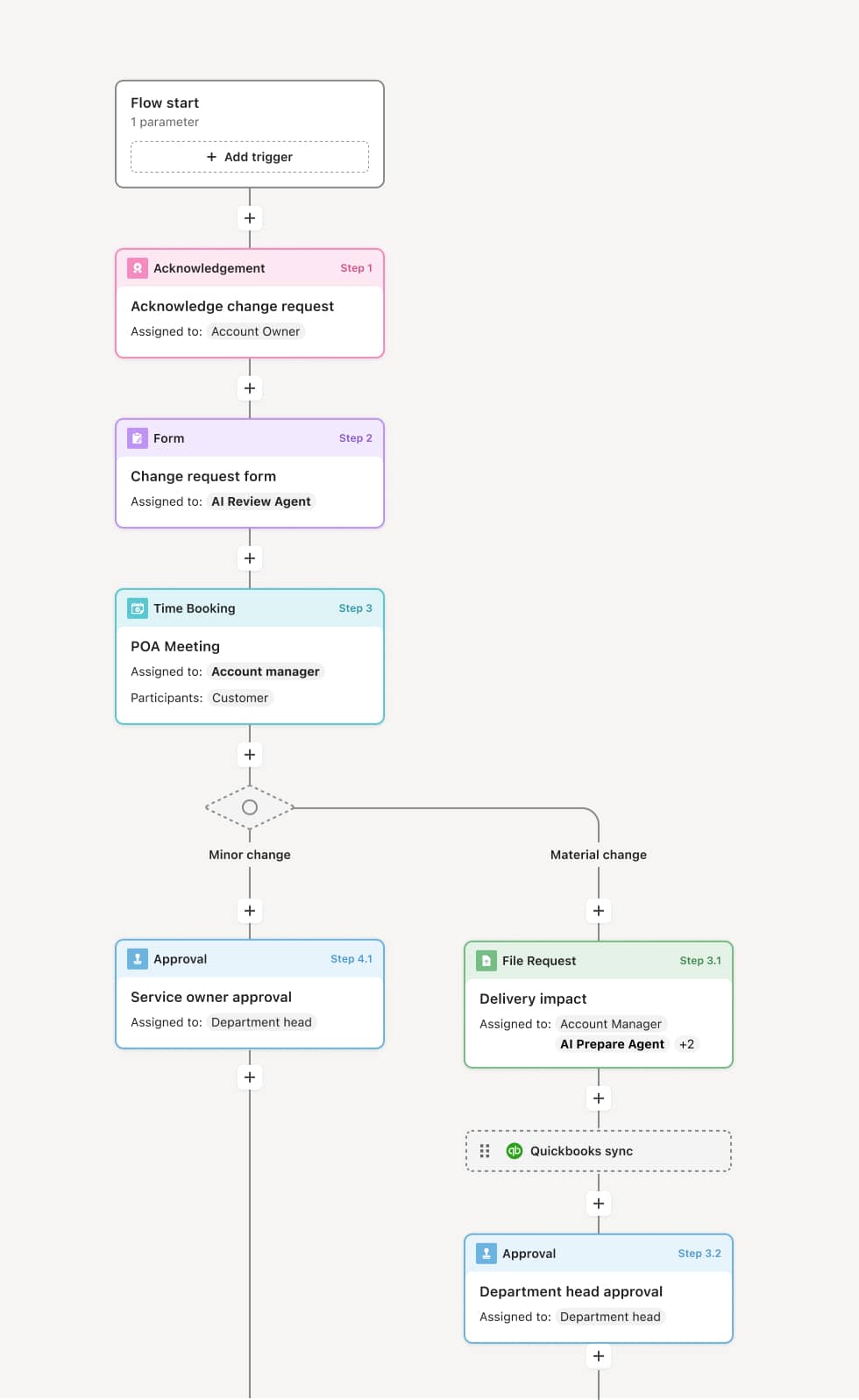
Your version of this process may vary based on roles, systems, data, and approval paths. Moxo’s flow builder can be configured with AI agents, conditional branching, dynamic data references, and sophisticated logic to match how your organization runs this workflow. The steps below illustrate one example.
Inspection completion and findings submission
The process begins when a field inspector completes an inspection and submits the findings, including observations, measurements, photographs, and any identified non-conformances. An AI Agent may assist by validating that all required inspection checklist items have been addressed and that supporting documentation is attached.
Findings review and evaluation
A quality reviewer evaluates the inspection findings against the applicable standards, specifications, or regulatory requirements. Clean inspections with no non-conformances may be routed directly for approval. Inspections with findings require the reviewer to assess the severity of each non-conformance and determine whether corrective action is needed, whether the finding is acceptable with conditions, or whether the finding blocks approval.
Compliance assessment (if applicable)
For inspections with regulatory implications, a compliance officer reviews the findings to determine whether any non-conformances create compliance exposure. This step evaluates whether the inspection results satisfy regulatory requirements and whether any findings require reporting to external authorities.
Approval decision
The inspection results, along with any reviewer and compliance assessments, are routed to the designated approver. The approver makes a formal decision: approved, conditionally approved with specified corrective actions, or failed requiring re-inspection. If conditionally approved, the conditions and required actions are documented and tracked within the workflow.
Corrective action and re-inspection (if required)
If the inspection fails or is conditionally approved, the responsible party addresses the identified non-conformances. Once corrective actions are complete, the item is re-inspected and the findings are resubmitted for review and approval. The workflow tracks each cycle until final approval is achieved.
Clearance and record closure
Upon approval, the inspected item is formally cleared for its next operational stage. The complete inspection record, including all findings, reviewer assessments, approval decisions, and any corrective action history, is stored for quality management, regulatory compliance, and operational reference.
This process commonly relies on inputs such as inspection checklists, field observations, photographs, measurement data, standards references, and prior inspection history. It may be triggered by the completion of a scheduled inspection, a regulatory requirement, or an operational milestone. Systems commonly connected include quality management systems for inspection records and standards, ERP platforms like SAP for asset or product data, and compliance management systems for regulatory tracking.
Key decision points include whether the inspection findings are clean or contain non-conformances, what severity level each non-conformance represents, whether non-conformances require corrective action or can be accepted with conditions, whether regulatory reporting is triggered by any finding, and whether the item is cleared for its next operational stage. If the inspection fails, the workflow routes corrective action requirements and schedules re-inspection.
Inspection findings submitted without complete documentation, delaying review while the inspector provides additional detail. Non-conformance severity assessed inconsistently, causing similar findings to receive different dispositions. Corrective actions not tracked to completion, leaving non-conformances unresolved. Conditional approvals treated as full approvals, allowing items to proceed without required follow-up. Inspection records not linked to the asset or product, making it difficult to retrieve history during audits or future inspections.
AI Agents validate inspection submission completeness by checking that all checklist items, measurements, and supporting documentation are included before routing to reviewers.
Routes inspection findings to the appropriate reviewer and approver based on inspection type, non-conformance severity, and regulatory applicability.
Tracks corrective action and re-inspection cycles within the workflow, ensuring non-conformances are resolved before final clearance.
Connects to quality management and ERP systems to pull standards references, asset data, and prior inspection history into the review process.
Maintains a complete inspection approval record for every inspected item, supporting quality certification, regulatory compliance, and operational audit.