Accounts payable manager
Finance controller
Procurement lead
Department head
Operations manager
CFO

This process is used when a vendor or supplier invoice is received and must be validated and authorized before payment can be released. It is triggered when an invoice arrives via email, EDI, or portal submission, when a purchase order-linked delivery is confirmed, or when a non-PO invoice requires departmental approval. It applies when the organization needs to enforce three-way matching between invoices, purchase orders, and receiving records, and when invoices must be coded, budgeted, and approved at the correct authority level before payment. This process is common across all industries and is especially critical in organizations with high invoice volumes, multiple vendors, or strict financial controls.
The invoice approval process typically involves accounts payable staff who receive and process invoices, procurement teams who validate invoices against purchase orders and contracts, department heads or budget owners who approve non-PO invoices or exceptions, finance controllers who authorize high-value or flagged payments, and operations teams who confirm receipt of goods or services.
Reduced payment errors through systematic validation of invoices against purchase orders, contracts, and delivery records before authorization. Faster payment cycles by automating matching for clean invoices and routing exceptions directly to the right reviewer. Stronger vendor relationships because validated invoices are paid on time and disputes are resolved within a structured process. Clear spend accountability with every invoice linked to an approver, budget, and GL code before payment is released. Fewer duplicate payments because AI-assisted validation catches duplicate invoices and mismatched amounts before they reach a human approver.
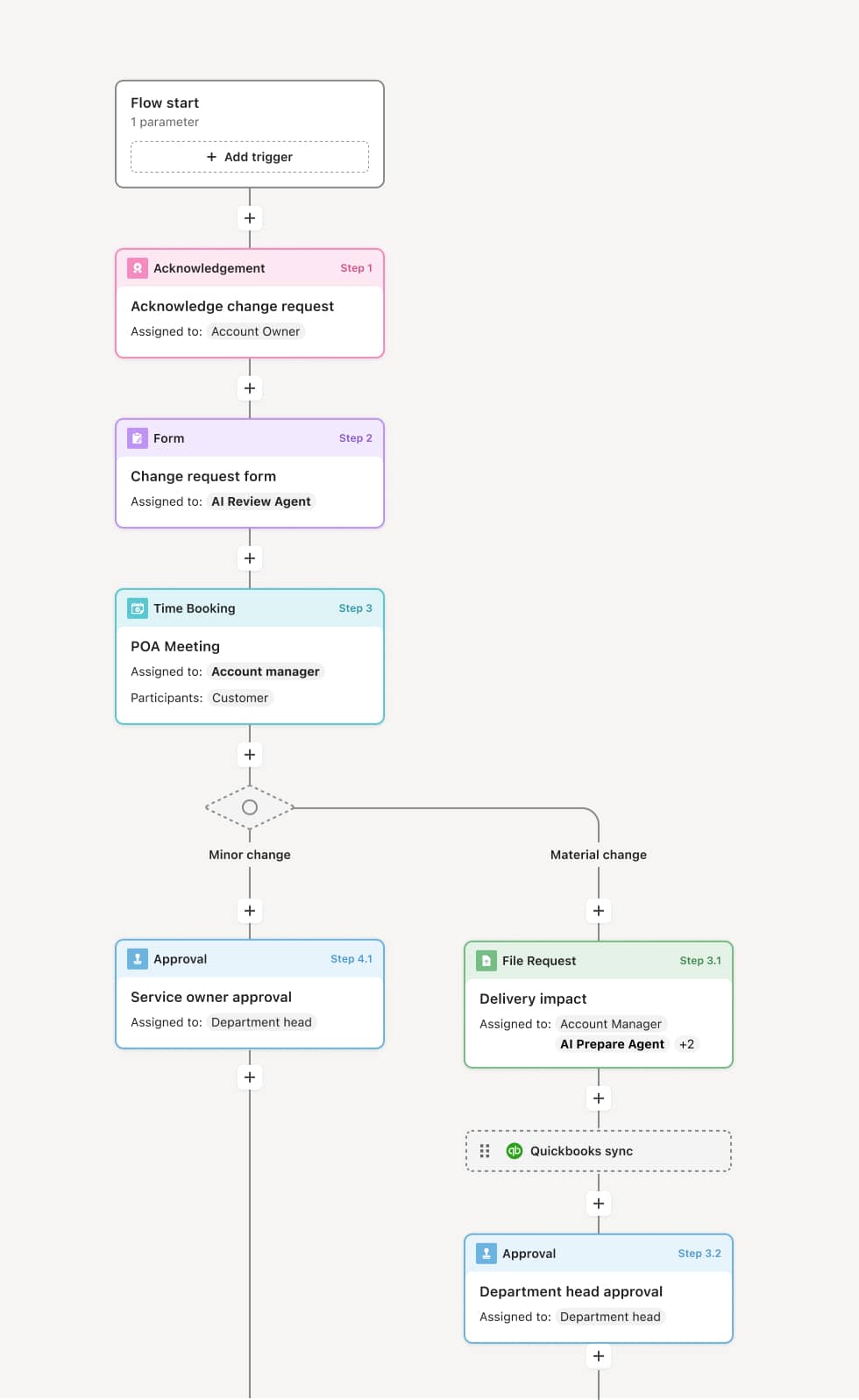
Your version of this process may vary based on roles, systems, data, and approval paths. Moxo’s flow builder can be configured with AI agents, conditional branching, dynamic data references, and sophisticated logic to match how your organization runs this workflow. The steps below illustrate one example.
Invoice receipt and data capture
The process begins when a vendor invoice is received through any channel—email, EDI, supplier portal, or physical mail. The invoice data is captured, including vendor details, invoice number, line items, quantities, amounts, and payment terms. An AI Agent may assist by extracting data from the invoice document, validating it against the vendor master, and checking for duplicate submissions.
Three-way matching
The invoice is matched against the corresponding purchase order and goods receipt or service confirmation. The AI Agent compares line items, quantities, unit prices, and totals. Invoices that match within configured tolerances are flagged as clean and routed for streamlined approval. Invoices with discrepancies—such as quantity variances, price differences, or missing receipts—are flagged as exceptions for human review.
Exception review and resolution
Flagged invoices are routed to the appropriate reviewer based on the type of discrepancy. Procurement reviews pricing or contract discrepancies. Operations confirms receipt or delivery status. The reviewer evaluates the exception and either resolves it by adjusting the payable amount, contacting the vendor for correction, or approving the invoice with documented justification. The AI Agent may pull related purchase order and contract data to support the reviewer’s evaluation.
Budget and GL coding
Once validated, the invoice is coded to the appropriate general ledger accounts and cost centers. For non-PO invoices, the department head or budget owner reviews and assigns the correct coding. The AI Agent may suggest coding based on prior invoices from the same vendor or for similar expense categories.
Approval routing
The invoice routes to the designated approver based on amount, vendor, department, and organizational policy. Standard invoices within authority limits may be approved by the AP manager or department head. High-value invoices, invoices from new vendors, or those with unresolved exceptions route to the finance controller for additional authorization.
Payment release and record closure
Approved invoices are released to the payment queue and processed according to the vendor’s payment terms. Payment data flows to connected financial systems for disbursement, GL posting, and vendor ledger updates. The complete invoice record—including the original document, matching results, exception history, approvals, and payment details—is stored for audit, reconciliation, and vendor management.
This process commonly relies on inputs such as vendor invoices, purchase orders, goods receipts, service confirmations, vendor master data, and contract terms. It may be triggered by invoice receipt via email, EDI, or supplier portal, or by a delivery confirmation from the operations team. Systems commonly connected include ERP platforms like NetSuite or SAP for purchase order and GL data, procurement systems for contract reference, and banking or payment platforms for disbursement.
Key decision points include whether the invoice passes three-way matching within configured tolerances, how discrepancies between invoiced and ordered amounts are resolved, whether non-PO invoices have appropriate departmental authorization, and whether high-value or exception invoices require additional financial approval. If a vendor dispute is initiated, the workflow tracks the resolution before payment proceeds.
Invoices processed without three-way matching, leading to overpayments or payments for undelivered goods. Duplicate invoices not detected, resulting in double payments that require recovery. Non-PO invoices approved without budget owner sign-off, bypassing spend controls. GL coding errors not caught before payment, creating reconciliation burden at period close. Exception resolution cycles extending beyond payment terms, triggering late payment penalties and damaging vendor relationships.
AI Agents perform automated three-way matching of invoices against purchase orders and delivery records, routing clean invoices for fast approval and flagging exceptions for human review.
Routes invoices to the correct approver based on amount, vendor, and exception type, ensuring the right authority level is engaged without manual triage.
Tracks exception resolution within the workflow, maintaining visibility from discrepancy identification through vendor communication and final disposition.
Connects to ERP systems like NetSuite or SAP for purchase order data, GL coding, and payment processing, eliminating manual data transfer between systems.
Maintains a complete invoice approval record from receipt through payment, supporting vendor management, financial audit, and spend analysis.