Operations manager
Finance controller
Department head
CFO
Procurement lead
Budget owner

This process is used when a team or department requests approval for operational expenditure such as software subscriptions, contractor engagements, office costs, travel, or other recurring or one-time operational costs. It applies when the expenditure exceeds predefined thresholds requiring finance or leadership review, when the request falls outside the approved budget, or when spending policy requires documented authorization. It is triggered by an expenditure request, a purchase requisition, or a budget reallocation. Ideal for organizations with structured spending controls, multi-level approval hierarchies, or environments where OPEX management is closely tied to financial performance targets.
Operations managers or department leads submit expenditure requests with business justification and budget context. Budget owners validate that the request aligns with allocated funds and departmental priorities. Finance controllers review spending policy compliance, budget availability, and forecast impact. Procurement leads evaluate vendor selection and contractual terms when applicable. CFOs or executive sponsors authorize expenditures above defined thresholds or outside approved budgets.
Faster OPEX processing by routing requests through finance and leadership based on defined thresholds rather than manual escalation. Clear spending accountability with every expenditure traceable to who requested, justified, and approved it. Reduced budget overruns by validating expenditures against available budget and policy before funds are committed. Improved forecast accuracy by capturing approved expenditures in real time and reflecting them in financial planning.
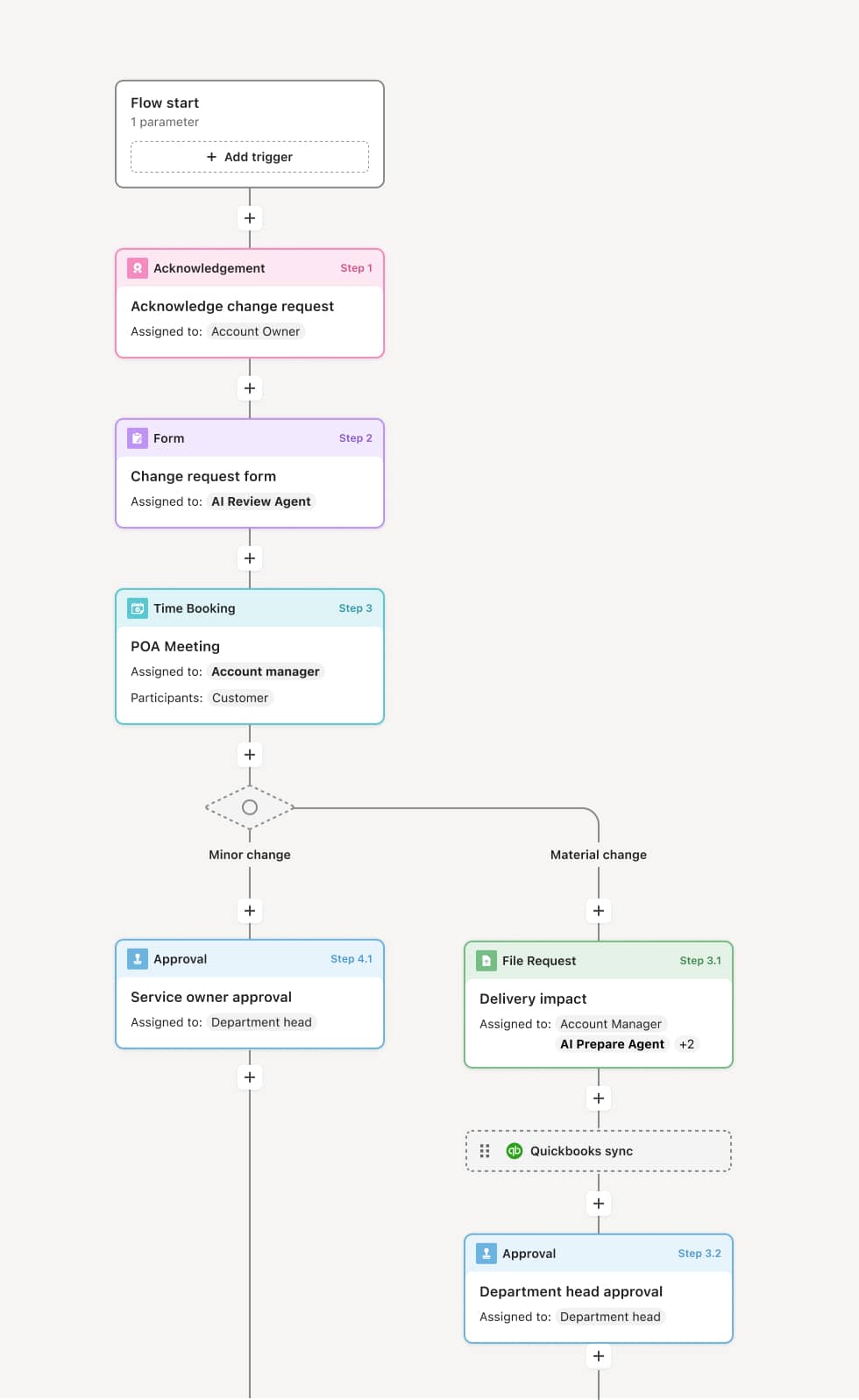
Your version of this process may vary based on roles, systems, data, and approval paths. Moxo’s flow builder can be configured with AI agents, conditional branching, dynamic data references, and sophisticated logic to match how your organization runs this workflow. The steps below illustrate one example.
Expenditure request submission
The process begins when an operations manager or department lead submits an OPEX request. The submission includes the expenditure description, amount, vendor or supplier, business justification, budget line item, and expected timing. An AI agent can validate that the request is complete and flag any fields that are missing or inconsistent with policy requirements.
Budget owner review
The budget owner evaluates whether the request aligns with departmental priorities and approved budget allocation. If the expenditure is within the budget owner’s discretionary authority, it may be approved at this stage. If it exceeds the budget owner’s limit or falls outside the approved plan, it is escalated for finance review.
Finance review
The finance controller reviews the request against spending policies, budget availability, and forecast impact. This includes confirming that the budget category has sufficient remaining allocation, evaluating whether the expenditure creates a variance that requires reforecasting, and assessing any policy exceptions. If the request is non-compliant or creates budget risk, finance provides feedback and the request returns to the submitter for adjustment.
Procurement review
If the expenditure involves vendor selection, contract terms, or procurement policy considerations, the procurement lead evaluates the request. This may include validating preferred vendor status, reviewing contract terms, or confirming compliance with procurement guidelines. For expenditures not involving procurement, this step is bypassed.
Executive authorization
For requests above a defined dollar threshold, outside the approved budget, or involving multi-year commitments, the CFO or an executive sponsor provides final authorization. An AI agent can summarize the request, reviewer feedback, and budget utilization context to support efficient executive decision-making.
Approval confirmation and commitment
Upon final approval, the submitter is notified, budget records are updated, and the expenditure is authorized for commitment. Downstream procurement, vendor onboarding, or payment workflows are initiated as applicable.
This process commonly relies on inputs such as expenditure request forms, budget utilization reports, vendor quotes, contract terms, and spending policy documentation. It may be triggered by events like a purchase requisition, a subscription renewal, a contractor engagement request, or a budget reallocation. Systems such as an ERP (NetSuite, SAP), a financial planning tool (Anaplan, Adaptive Planning), or a procurement platform (Coupa, Ariba) are commonly connected to provide budget data, spending history, and vendor information.
Key decision points include whether the expenditure falls within the budget owner’s discretionary authority or requires finance review, whether the request complies with spending policies and has sufficient budget allocation, whether procurement review is required based on the vendor or contract involved, and whether the dollar amount or budget impact triggers executive authorization.
Incomplete justification where expenditure requests lack clear business rationale, causing finance to request additional information and extending the approval cycle. Budget data lag where approvals are evaluated against outdated budget utilization figures, leading to unintentional overspend. Threshold ambiguity where submitters are unsure which requests require escalation, causing delays when requests are routed to the wrong level. Disconnected commitment tracking where approved expenditures are not reflected in budget systems, creating discrepancies between authorized and actual spend.
Orchestrates OPEX review across budget owners, finance, procurement, and executives within a single workflow, replacing email-based approval chains that slow expenditure processing.
Routes requests conditionally based on dollar thresholds, budget category, and vendor involvement, ensuring the right reviewers are engaged at each level.
AI agents validate request completeness and flag policy exceptions before routing begins, reducing rework caused by incomplete submissions.
Supports threshold-based escalation so that requests above defined limits automatically route to executive sponsors without manual triage.
Connects to ERP and financial planning systems to pull real-time budget availability and update commitment records upon approval.
Documents every spending decision within the workflow, building a structured record that supports financial governance, variance analysis, and audit readiness.