Accounts payable manager
Finance controller
Chief financial officer
Department head
Procurement manager
Operations director

This process is used whenever an organization needs to authorize an outgoing payment, whether to a vendor, partner, employee, or service provider. It is triggered when an invoice is received, a purchase order is fulfilled, an expense report is submitted, or a contractual payment milestone is reached. It becomes especially important when payment amounts exceed standard thresholds, when budgets are constrained, or when multiple departments share cost allocation. Payment approval is relevant across virtually every industry and operational function.
Payment approval typically involves the requestor or submitting party who initiates the payment request, an accounts payable specialist who validates documentation and coding, a budget owner or department head who confirms the charge against their allocation, and a finance controller or CFO who provides final authorization for payments above defined limits. External parties such as vendors may also participate by providing invoices or correcting discrepancies.
Faster payment cycles by routing requests directly to the appropriate approver without manual forwarding or email-based chasing. Reduced unauthorized payments through structured validation that ensures every disbursement has supporting documentation and required sign-offs. Clear budget alignment by confirming each payment against its allocated budget before approval, preventing cost overruns. Auditable approval chains with every decision, delegation, and exception captured in a single process record.
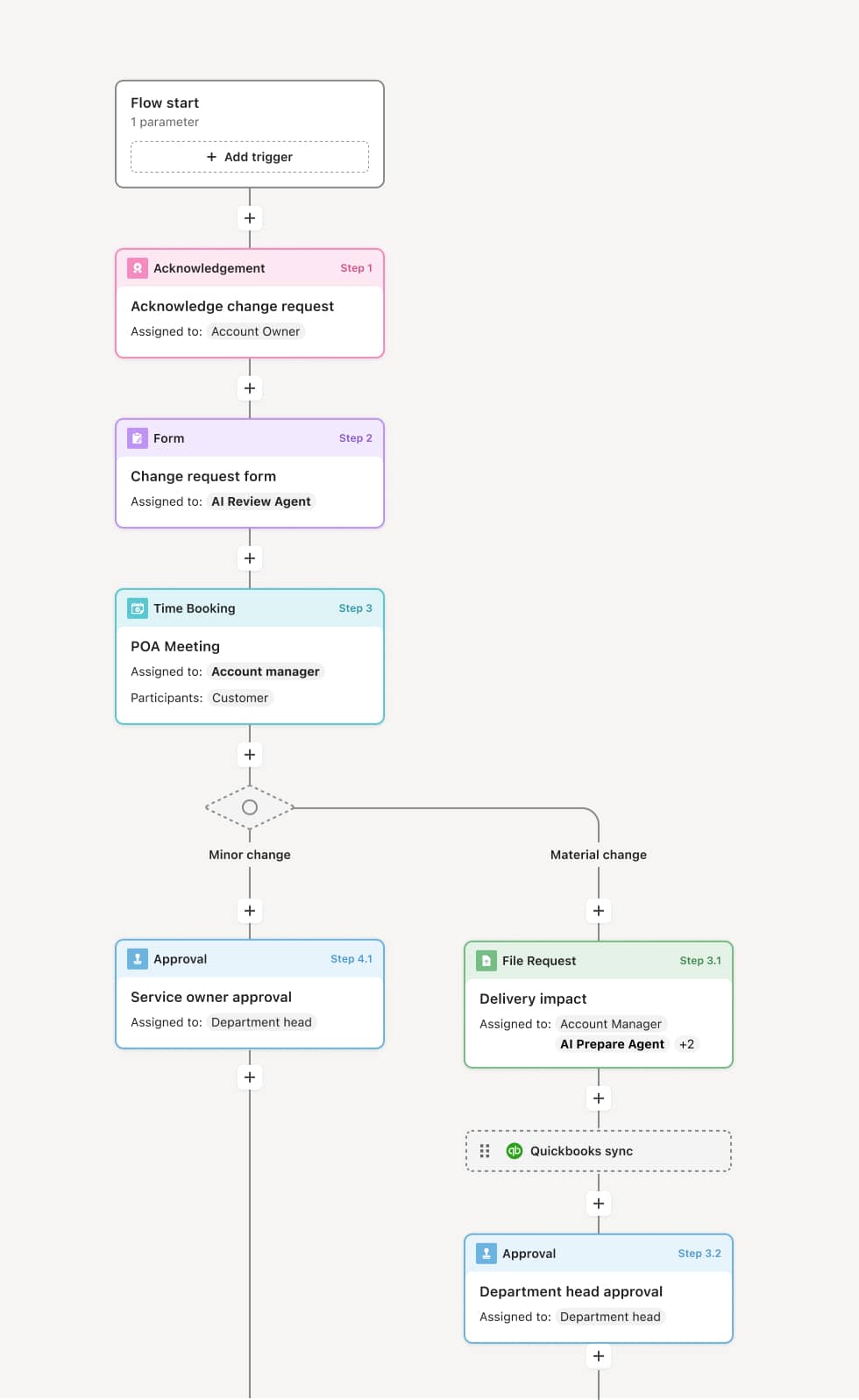
Your version of this process may vary based on roles, systems, data, and approval paths. Moxo’s flow builder can be configured with AI agents, conditional branching, dynamic data references, and sophisticated logic to match how your organization runs this workflow. The steps below illustrate one example.
Request initiation
The process begins when a payment request is submitted, either through a form, an invoice upload, or a trigger from a connected system such as an ERP or procurement platform. The request includes details such as the payee, amount, cost center, payment terms, and supporting documentation. An AI Agent may assist by pre-populating fields from prior transactions or connected records, reducing manual data entry and the risk of errors at the point of submission.
Validation and coding
Once submitted, the payment request is routed to an accounts payable specialist or finance coordinator for initial validation. This includes checking that the invoice matches a purchase order or contract, verifying that the amount and payment terms are correct, and confirming the appropriate general ledger coding. If information is missing or inconsistent, the request is returned to the submitter with specific instructions for correction. An AI Agent may flag common discrepancies such as duplicate invoices or mismatched amounts.
Budget confirmation
After validation, the request moves to the relevant budget owner or department head who confirms that the payment falls within their approved budget and is an expected expense. If the payment crosses multiple cost centers, parallel confirmations may be required from each responsible party. This phase ensures that no payment proceeds without an explicit acknowledgment from the party whose budget it impacts.
Approval routing
With validation and budget confirmation complete, the payment request is routed to the appropriate approver based on amount, type, and organizational policy. Payments below a defined threshold may be auto-approved after validation, while larger amounts require explicit sign-off from a finance controller, CFO, or other senior authority. If an approver is unavailable, the process may escalate based on configured delegation rules. The approver reviews the complete package, including the original request, supporting documents, validation notes, and budget confirmation, before authorizing or declining the payment.
Disbursement and closure
Once approved, the payment moves to processing, where the accounts payable team executes the disbursement through the organization's payment system. The payee is notified, and the transaction is recorded against the relevant accounts. All approvals, exceptions, and supporting documentation are retained as a complete process record, linking the payment to its originating request and every decision made along the way.
This process commonly relies on inputs such as vendor invoices, purchase orders, expense reports, contract payment schedules, and budget allocation data. It may be triggered by an invoice submission, a system event from an ERP like NetSuite or SAP, a procurement approval, or a scheduled payment milestone. Connected systems such as QuickBooks, Workday, or Coupa may provide financial data, vendor records, and budget information.
Key decision points include whether the invoice or payment request matches a valid purchase order or contract, whether the payment amount is within the submitter's or department's approval authority, whether the budget has sufficient remaining allocation, and whether the payment type or amount triggers an escalation to senior leadership.
Missing or mismatched documentation, where invoices lack purchase order references or amounts do not reconcile, stalling the review. Unclear cost center ownership, when shared expenses require multiple budget confirmations but routing is ambiguous. Approval delays from delegation gaps, when the designated approver is unavailable and no escalation path has been defined. Duplicate payment risk, when similar invoices from the same vendor are processed without cross-referencing prior submissions.
Orchestrates the full payment approval lifecycle from request submission through validation, budget confirmation, approval, and disbursement across all involved parties.
AI Agents flag duplicate invoices and validation errors before the request reaches a human reviewer, reducing rework and preventing costly mistakes.
Routes approvals conditionally by amount, type, and policy so payments reach the correct authority without manual forwarding or guesswork.
Extends existing finance and ERP systems such as NetSuite, SAP, or QuickBooks by connecting invoice data, budget records, and payment processing directly into the workflow.
Captures a complete record of every validation, approval, and exception so finance teams can trace any payment back to its supporting documentation and authorization chain.