Project manager
Engagement manager
Finance controller
Resource manager
Professional services director
Billing operations manager

This process is used whenever professional services hours need to be reviewed and approved before they are billed to a client or recorded for internal resource accounting. It is triggered on a regular cadence, such as weekly or biweekly, or when a project milestone requires a time reconciliation before invoicing. Time approval becomes especially important when projects are billed on a time-and-materials basis, when consultants work across multiple engagements, or when budget-to-actual variance must be monitored closely. This process is relevant in consulting, IT services, legal, accounting, engineering, and any organization delivering billable professional services.
Professional services time approval typically involves the consultant or service professional who submits their time entries, a project manager or engagement lead who validates the hours against the project plan, a resource manager who reviews utilization across engagements, and a finance or billing team that authorizes the time for invoicing. The client may also participate when time entries require client acknowledgment before billing.
Accurate client billing by validating every time entry against the project scope and approved budget before it reaches an invoice. Early detection of budget variance by comparing submitted hours against the project plan at each approval cycle rather than waiting for end-of-project reconciliation. Improved utilization visibility by tracking billable and non-billable hours across consultants and engagements in real time. Reduced billing disputes through structured validation that ensures time entries are accurate, properly categorized, and supported before they are invoiced.
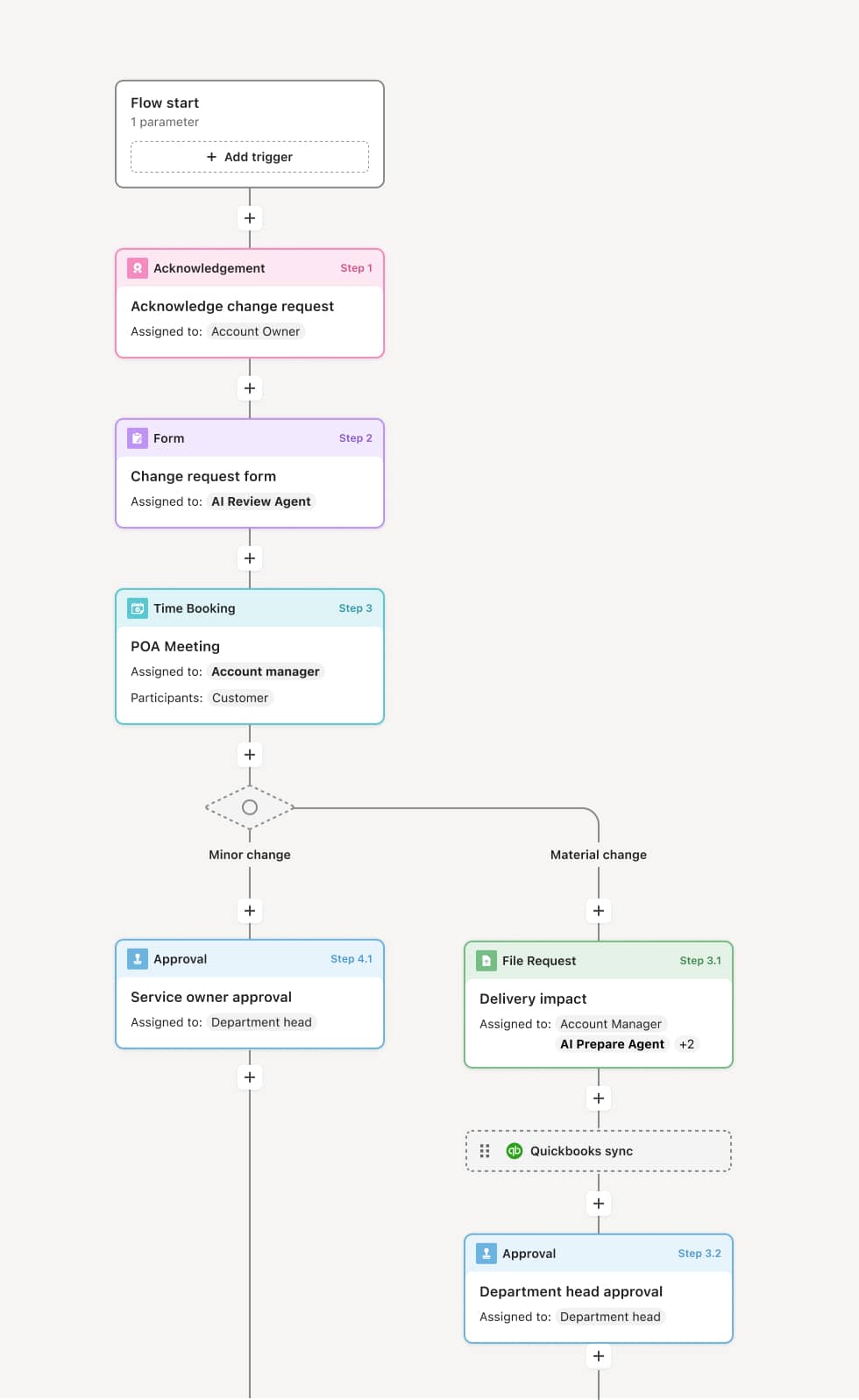
Your version of this process may vary based on roles, systems, data, and approval paths. Moxo’s flow builder can be configured with AI agents, conditional branching, dynamic data references, and sophisticated logic to match how your organization runs this workflow. The steps below illustrate one example.
Time entry submission
The process begins when a consultant or service professional submits their time entries for the review period. Each entry includes the project or engagement, the task or activity category, the number of hours, and any notes or descriptions of work performed. An AI Agent may assist by checking for common submission issues such as missing project codes, entries that exceed standard daily limits, or time allocated to closed or paused projects.
Project manager validation
Submitted time entries are routed to the project manager or engagement lead who validates the hours against the project plan. This includes confirming that the work described was expected, that the hours are reasonable for the task, and that the entries are correctly categorized as billable or non-billable. If entries need correction, the project manager returns specific entries to the consultant with notes explaining the required changes.
Budget and utilization review
After project-level validation, the time entries may be reviewed by a resource manager or finance lead who evaluates them in the context of overall project budget, utilization targets, and cross-engagement allocations. If the cumulative hours push the project beyond its approved budget, the reviewer may flag the variance and route the issue to the engagement lead for resolution before the time is approved for billing.
Billing authorization
With validation and budget review complete, the approved time entries are authorized for billing. The finance or billing team incorporates the approved hours into the client invoice, applying the correct rate structure and any contractual adjustments. If client acknowledgment is required before invoicing, the time summary is shared with the client for confirmation before the invoice is issued.
Record closure
Once billing is authorized and, if applicable, the client confirms the time, the entries are recorded as final. The complete record, including submitted entries, validation notes, budget flags, and billing authorization, is retained as part of the engagement’s financial history.
This process commonly relies on inputs such as time entries, project plans, budget allocations, rate cards, engagement contracts, and utilization targets. It may be triggered by a recurring time submission deadline, a project milestone, or an invoice preparation cycle. Systems such as a PSA platform like OpenAir, Mavenlink, or Kantata, a time tracking tool, or an ERP like NetSuite may provide time data, project budgets, and billing rates.
Key decision points include whether each time entry is accurately categorized and consistent with the project plan, whether the cumulative hours remain within the project’s approved budget, whether budget variance warrants escalation before billing proceeds, and whether client acknowledgment is required before the invoice is issued.
Late or incomplete time submissions, when consultants delay entry submission, compressing the review window and increasing the risk of errors reaching the invoice. Miscategorized entries, when billable work is recorded as non-billable or vice versa, distorting both revenue and utilization reporting. Budget overruns detected too late, when cumulative hours exceed the project budget but are not flagged until the invoice is prepared. Client disputes after invoicing, when time entries are billed without client-facing validation, leading to post-invoice corrections and relationship friction.
Orchestrates the full time approval lifecycle from submission through project validation, budget review, billing authorization, and record closure in a single coordinated process.
AI Agents validate time entries for common errors such as missing project codes, duplicate entries, and hours against closed projects before they reach a human reviewer.
Routes entries through project-level and budget-level review ensuring both operational accuracy and financial alignment are confirmed before billing proceeds.
Extends existing PSA and time tracking platforms such as OpenAir, Kantata, or NetSuite by connecting time data, project budgets, and billing rates directly into the approval workflow.
Captures a complete record of every submission, validation, and billing authorization so engagement and finance teams can trace any invoiced hour back to its approved time entry and project context.