Project manager
Program manager
Delivery director
Executive sponsor
Client partner
PMO director

This process is used when a project encounters an issue, risk, or decision that exceeds the authority or capacity of the project team to resolve. It is triggered when a deliverable is at risk of missing its deadline, when a resource conflict cannot be resolved at the project level, when a client raises concerns that require senior engagement, when budget overruns require additional authorization, or when a technical or operational blocker threatens the project timeline. Project escalation is common across all project-driven organizations and is especially important in consulting, IT services, construction, product development, and any environment where projects involve multiple stakeholders and tight deadlines.
Project escalation typically involves the project manager who identifies and submits the escalation, a delivery lead or program manager who triages the issue, an executive sponsor or senior leader who provides resolution authority, and the client partner or account lead when the escalation involves a client relationship. Supporting teams such as finance, legal, or HR may also be engaged depending on the nature of the escalation.
Faster resolution of project blockers by routing issues directly to the decision-maker with authority to resolve them rather than allowing them to stall at the project level. Preserved project timelines by surfacing risks and issues early enough for leadership to intervene before deadlines are missed. Clear resolution accountability with every escalation, triage decision, and resolution outcome documented as part of the project record. Improved client confidence by demonstrating a structured response to issues rather than allowing them to linger without visible action.
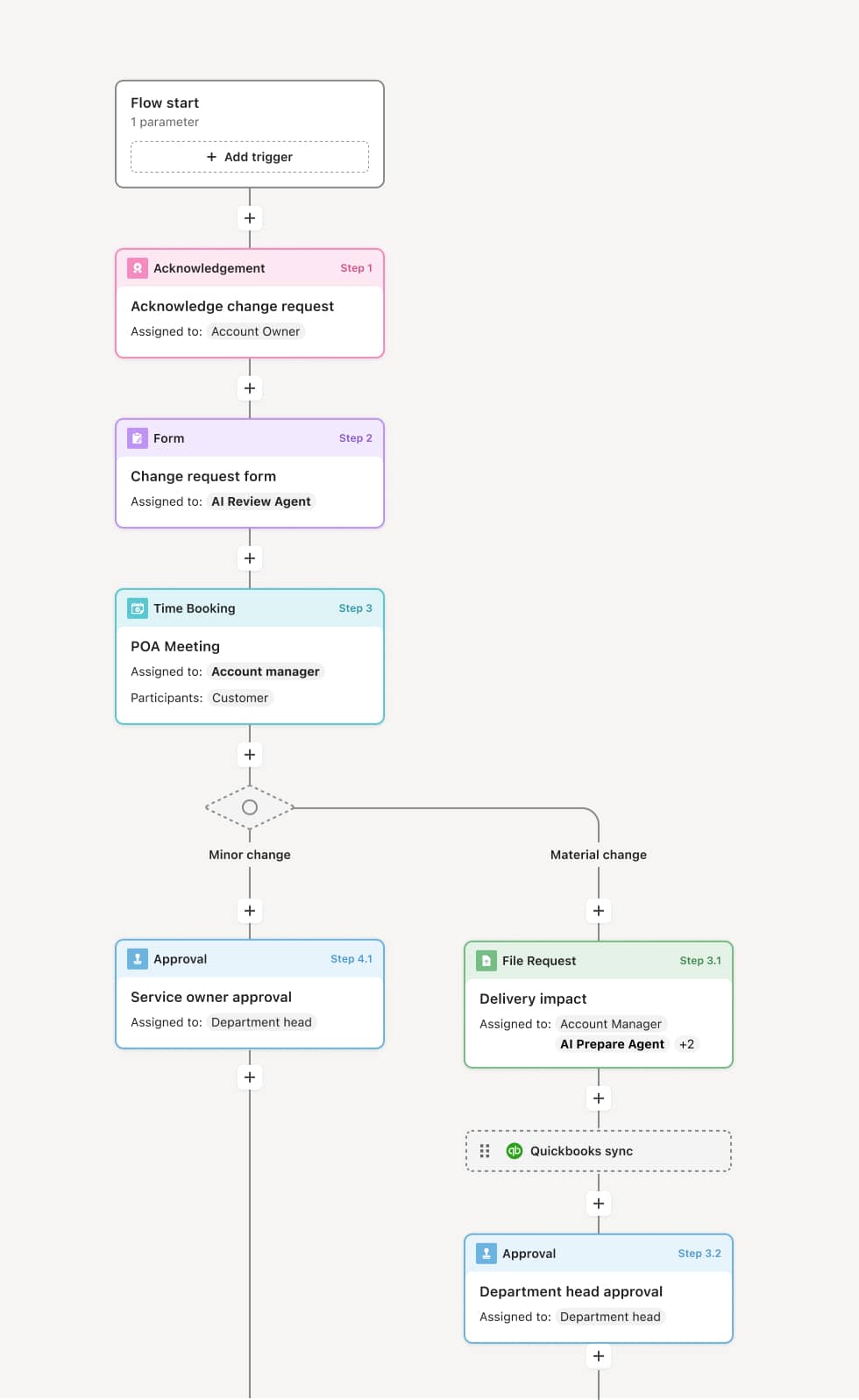
Your version of this process may vary based on roles, systems, data, and approval paths. Moxo’s flow builder can be configured with AI agents, conditional branching, dynamic data references, and sophisticated logic to match how your organization runs this workflow. The steps below illustrate one example.
Escalation identification and submission
The process begins when a project manager identifies an issue, risk, or decision that cannot be resolved within the project team’s authority or timeline. The escalation submission includes a description of the issue, the impact on the project (timeline, budget, scope, or client relationship), actions already taken, and the specific resolution or decision being requested. An AI Agent may assist by categorizing the escalation based on type and severity, identifying whether similar escalations have been raised on the same project, and preparing a context summary for the triage team.
Triage and routing
The escalation is received by a delivery lead, program manager, or PMO who triages it based on severity, type, and the resolution authority required. Low-severity escalations may be resolved by reassigning resources or adjusting scope within existing authority. High-severity escalations, such as those involving budget overruns, client dissatisfaction, or regulatory risk, are routed to an executive sponsor or senior leader. The triage decision and its rationale are documented.
Resolution engagement
The designated resolution owner, whether an executive sponsor, senior delivery lead, or client partner, reviews the escalation and engages the necessary parties to work toward resolution. This may involve convening a decision meeting, reallocating resources, authorizing budget changes, or engaging directly with the client. If the resolution requires input from supporting functions such as legal or finance, those teams are brought into the process at this stage.
Decision and action
The resolution owner makes or authorizes the required decision. This may include approving a timeline extension, authorizing additional budget, agreeing to a scope change, or directing a change in project approach. The decision, its rationale, and any conditions are documented. All affected project team members and stakeholders are notified of the resolution and any resulting changes to the project plan.
Closure and lessons captured
Once the resolution is implemented and the project team confirms the issue is addressed, the escalation is formally closed. The complete escalation record, including the original submission, triage decision, resolution engagement, decision, and closure confirmation, is retained as part of the project’s governance history. For recurring or high-severity escalations, lessons learned are captured to inform future project risk management.
This process commonly relies on inputs such as the escalation submission, project status reports, budget-to-actual comparisons, risk registers, client communications, and resource allocation data. It may be triggered by a project status review, a client complaint, a missed milestone, or a risk event. Systems such as a PPM tool like Planview, a PSA platform, or a project management tool like Jira or Asana may provide project status data, resource assignments, and risk tracking.
Key decision points include whether the issue truly exceeds the project team’s authority and requires escalation, how the escalation is classified and routed based on severity and type, whether the resolution requires budget, timeline, or scope changes that need senior authorization, and whether the resolution fully addresses the issue or leaves residual risk.
Late escalation, when the project team delays raising the issue in hopes of resolving it internally, leaving insufficient time for leadership to intervene effectively. Insufficient context in the submission, when the escalation does not clearly describe the impact, actions taken, or resolution requested, slowing triage and engagement. Unclear resolution authority, when the escalation is routed to a leader who does not have the authority to make the required decision, causing additional delays. Unimplemented resolutions, when a decision is made at the leadership level but is not communicated back to the project team or translated into updated project plans.
Orchestrates the full escalation lifecycle from identification through triage, resolution engagement, decision, and closure in a single coordinated process.
AI Agents categorize escalations and prepare context summaries so triage teams and resolution owners can act immediately with full situational awareness.
Routes escalations to the appropriate authority based on severity and type ensuring low-severity issues are resolved quickly while critical escalations reach senior leadership without delay.
Extends existing project management and PPM systems such as Jira, Asana, or Planview by connecting project status, risk data, and resource information directly into the escalation workflow.
Captures a complete record of every escalation, triage decision, resolution, and closure so project and governance teams can trace any issue back to its submission and the decision chain that resolved it.