Project manager
Risk manager
Program director
Operations lead
Executive sponsor
Compliance officer

This process is used when a project risk is identified that exceeds the authority or capacity of the current risk owner to mitigate. It is triggered when risk severity crosses a defined threshold, when mitigation efforts have stalled, when risks threaten critical path milestones, or when external factors introduce new uncertainty that requires senior decision-making. Project risk escalation is common in construction, technology delivery, financial services, healthcare, and any industry where project complexity and regulatory requirements create layered risk exposure.
The primary roles involved include the project manager or risk owner who initiates the escalation, the risk manager or PMO lead who evaluates severity and routing, the executive sponsor or steering committee who makes resolution decisions, functional leads who may be required to provide input or implement mitigation actions, and in some cases external stakeholders such as clients, regulators, or partners whose awareness or cooperation is required for resolution.
Faster risk resolution by routing escalations directly to decision-makers with full context, eliminating delays caused by unclear ownership or missing information. Reduced downstream impact because risks are surfaced before they compound into schedule delays, budget overruns, or quality failures. Clear escalation authority at every level, so project teams know exactly who to engage and what information is required for each tier of risk. Improved risk visibility across the project portfolio, enabling leadership to see emerging patterns and allocate resources proactively. Stronger stakeholder trust because risks are communicated transparently and addressed through a documented, accountable process.
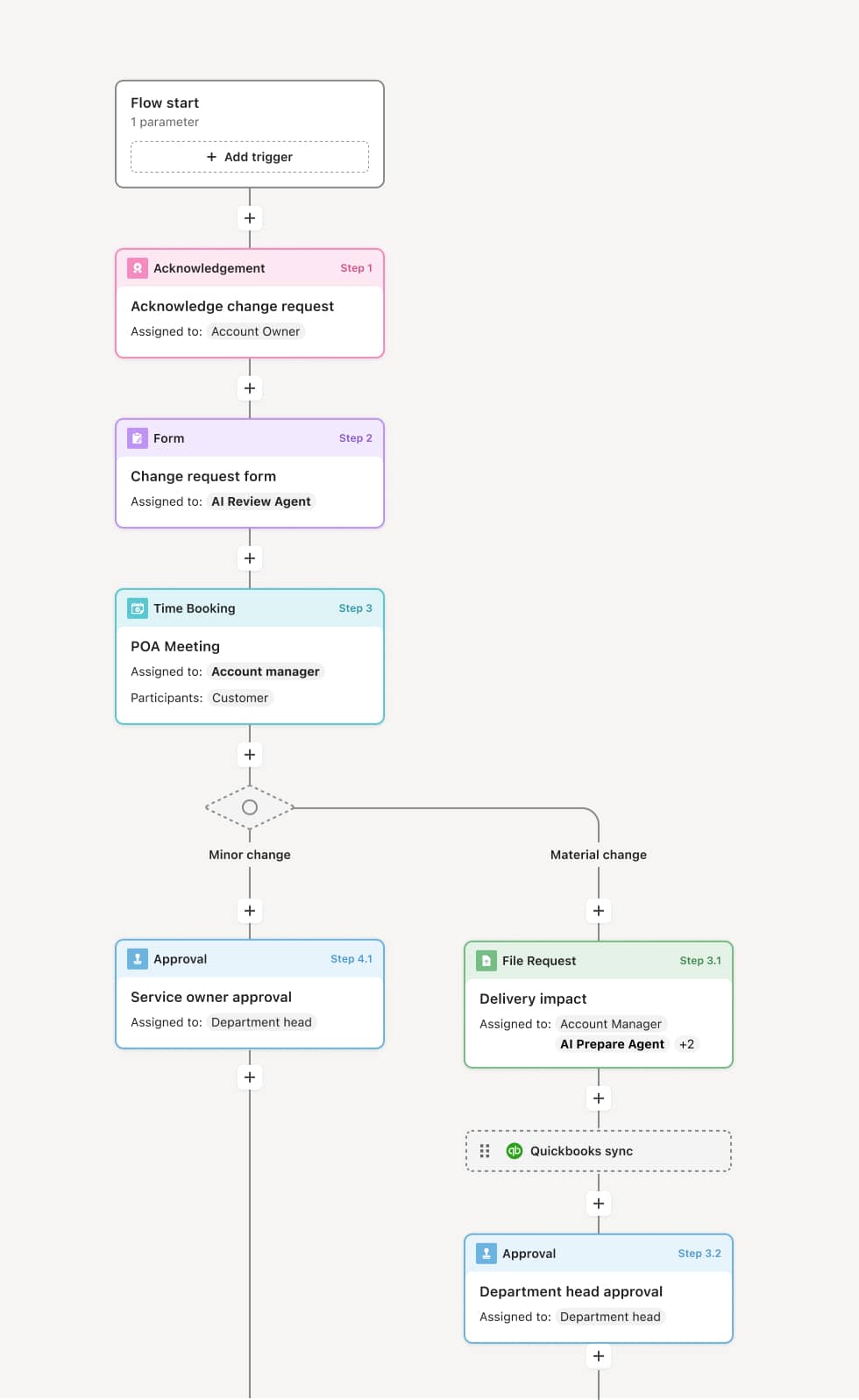
Your version of this process may vary based on roles, systems, data, and approval paths. Moxo’s flow builder can be configured with AI agents, conditional branching, dynamic data references, and sophisticated logic to match how your organization runs this workflow. The steps below illustrate one example.
Risk identification and initial assessment
The process begins when a project team member or risk owner identifies a risk that may require escalation. The risk is documented with its description, potential impact, likelihood, affected milestones, and any mitigation actions already attempted. An AI agent can assist by pulling relevant project context, prior risk entries, and status data from connected systems to ensure the escalation package is complete before it moves forward.
Threshold evaluation and routing
Once the risk is documented, it is evaluated against predefined escalation thresholds. These thresholds may be based on financial impact, schedule exposure, safety implications, or regulatory risk. If the risk falls within the current owner’s authority, it is managed locally. If it exceeds the threshold, the escalation is routed to the next level of decision-making authority. The routing path may vary depending on the risk category—for example, a financial risk may route to the CFO or finance committee, while a safety risk may route to a compliance or safety officer.
Escalated review and decision
The designated decision-maker or review body receives the escalation with full context, including the risk assessment, mitigation options, projected impact, and any dependencies. They evaluate whether to approve a proposed mitigation plan, allocate additional resources, accept the risk, or escalate further. If the risk requires coordination across multiple teams or external parties, the process branches to engage those stakeholders in parallel. AI agents can summarize the risk context and highlight critical timelines to help decision-makers act efficiently.
Mitigation activation and tracking
Once a decision is made, the chosen mitigation actions are activated and assigned to the responsible owners. Progress is tracked against agreed timelines and success criteria. If mitigation stalls or conditions change, the risk may be re-escalated or adjusted. Stakeholders who need to be aware of the risk and its resolution—including external parties—are notified with appropriate context.
Resolution confirmation and closure
When the risk has been mitigated to an acceptable level or the conditions that triggered escalation have been resolved, the escalation is formally closed. The outcome, decision rationale, and any residual risk are recorded. This record becomes part of the project’s risk history and can inform future risk assessments and escalation thresholds.
This process commonly relies on inputs such as risk registers, project status reports, impact assessments, mitigation plans, and stakeholder communication records. It may be triggered by an update in a risk management system, a threshold breach flagged by project management tools, or a manual submission from the project team. Connected systems such as Jira, ServiceNow, Microsoft Project, or Smartsheet may feed risk data, while communication with external stakeholders may involve document sharing and acknowledgment actions.
Key decision points include whether the identified risk exceeds the current owner’s escalation threshold, which decision-making authority the risk should be routed to based on its category and severity, whether the proposed mitigation plan is approved or alternative actions are required, and whether the risk has been sufficiently resolved to close the escalation or requires further monitoring. If an escalation stalls or mitigation fails, the process may re-escalate to a higher authority.
Escalations triggered too late, allowing risks to compound into schedule or budget impacts before leadership is aware. Insufficient context provided with the escalation, slowing decision-making because reviewers must chase additional information. Unclear escalation thresholds, causing teams to either over-escalate routine risks or under-escalate critical ones. Mitigation ownership not clearly assigned, resulting in actions that are approved but never executed. Escalation closed prematurely without confirming that mitigation actions have actually resolved the underlying risk.
Routes risk escalations to the right decision-makers based on risk category, severity, and organizational structure, ensuring that each escalation reaches the appropriate authority without manual routing.
AI agents assist with risk context assembly by summarizing prior risk entries, pulling project data from connected systems, and flagging incomplete escalation packages before they reach reviewers.
Orchestrates parallel engagement when a risk requires input from multiple teams or external stakeholders, so that coordination happens within the process rather than through side channels.
Connects to project management and risk systems such as Jira, ServiceNow, or Smartsheet, extending existing risk workflows rather than duplicating them.
Maintains a structured record of every escalation, decision, and mitigation outcome, providing clear traceability for project governance and continuous improvement of risk management practices.