Revenue operations manager
Account manager
Finance director
Customer success lead
Sales operations manager
VP of revenue

This process is used when an existing contract, subscription, or service agreement approaches its expiration or renewal window and requires formal review before commitment. It applies when renewal terms need to be validated against current pricing, usage, or performance data, or when multi-year agreements require cross-functional sign-off. It is common when finance, legal, or revenue operations teams must coordinate on revised terms, pricing adjustments, or risk assessments before a renewal is executed. Ideal for SaaS, professional services, financial services, and any subscription or contract-driven business.
The renewal approval process typically involves account managers or customer success leads who initiate the renewal request and provide relationship context, revenue operations or sales operations managers who validate pricing and terms against current policies, finance reviewers who assess revenue impact and flag exceptions, and senior leaders or deal desk approvers who authorize non-standard terms or high-value renewals. External stakeholders such as the client or procurement contact may also participate in confirming updated terms.
Faster renewal cycle times by routing approvals to the right reviewers immediately, reducing lag between renewal initiation and execution. Fewer revenue leaks through consistent validation of pricing, discounts, and contract terms against current policies before approval. Clear renewal ownership so every renewal has a defined responsible party at each phase, from request through final sign-off. Reduced last-minute scrambles by surfacing upcoming renewals early and tracking progress across all stakeholders in real time. Stronger client retention signals because timely, well-coordinated renewals reflect operational maturity to clients and partners.
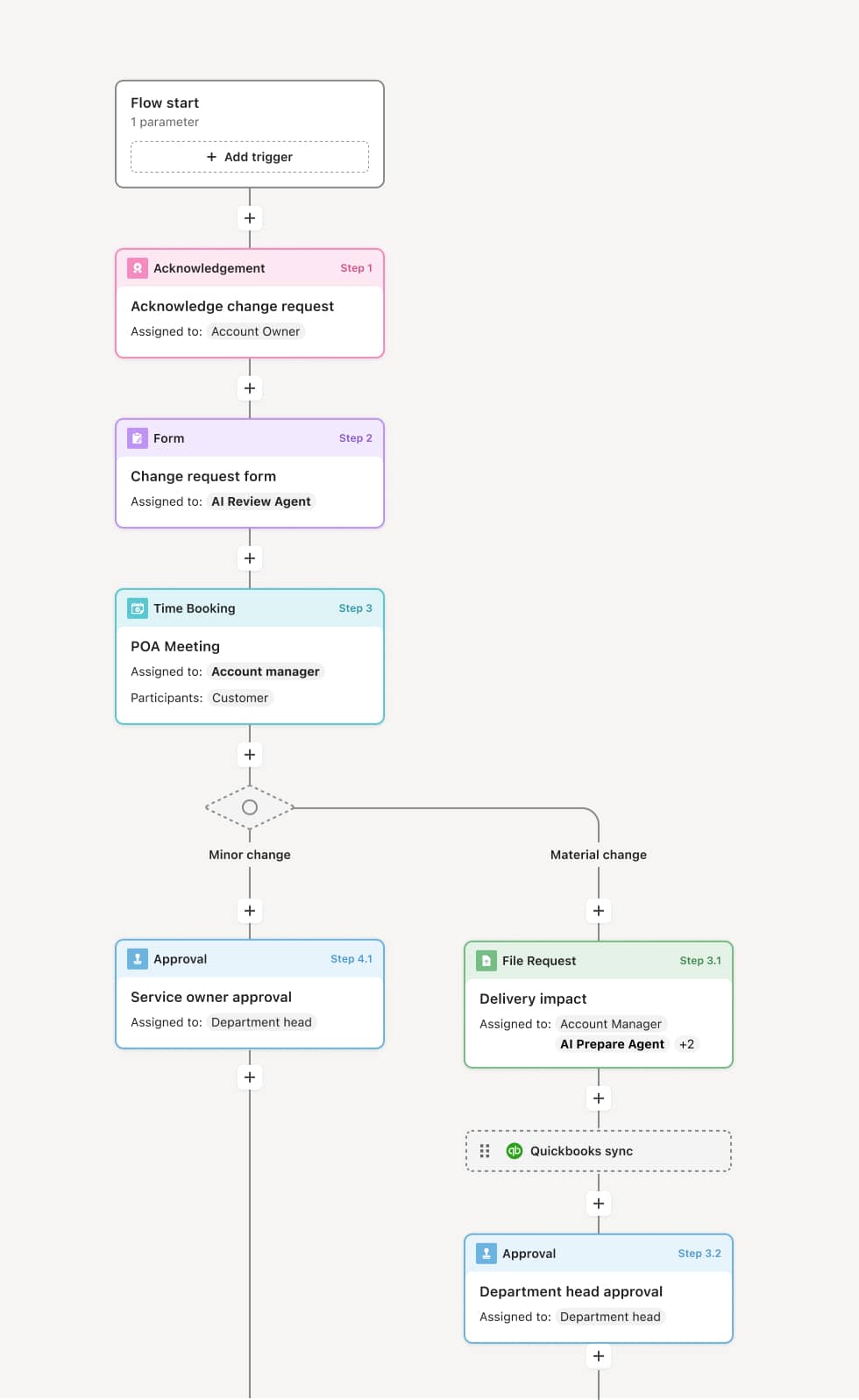
Your version of this process may vary based on roles, systems, data, and approval paths. Moxo’s flow builder can be configured with AI agents, conditional branching, dynamic data references, and sophisticated logic to match how your organization runs this workflow. The steps below illustrate one example.
Renewal identification and initiation
The process begins when a contract or subscription approaches its renewal window. This may be triggered by a system event from a CRM such as Salesforce or HubSpot, a scheduled reminder, or a manual request from an account manager. An AI Agent can assist by pulling together relevant account data, usage metrics, and prior contract terms to prepare the renewal request for review.
Account and terms review
The account manager or customer success lead reviews the current agreement alongside any changes in scope, pricing, or client requirements. Supporting documents such as usage reports, satisfaction scores, or open support tickets are gathered. If the renewal involves modified terms, the request is routed to revenue operations or a deal desk for policy validation. An AI Agent may flag discrepancies between proposed terms and standard pricing guidelines.
Financial and risk assessment
Finance reviews the revenue impact of the renewal, including any discounts, credits, or pricing adjustments. If the renewal exceeds certain value thresholds or involves non-standard terms, it is escalated to a senior approver or finance director. If the terms fall within standard parameters, the approval may proceed directly.
Approval decision
The designated approver reviews the complete renewal package, including account context, proposed terms, financial assessment, and any flagged exceptions. If additional review is required — for example, legal review of modified contract language — the process branches to include those reviewers before returning to the primary approver. The approver either authorizes the renewal, requests revisions, or declines.
Client confirmation and execution
Once internal approval is granted, the updated renewal terms are shared with the client or their procurement contact for confirmation. E-signatures or formal acknowledgments are collected. An AI Agent can prepare the renewal documents by referencing approved terms and pre-filling contract fields based on prior agreement data.
Closure and record update
Upon execution, the renewal is recorded in the system of record, CRM and billing systems are updated, and all stakeholders are notified. The completed renewal, including all supporting documents, approvals, and communications, is preserved as part of the operational record.
This process commonly relies on inputs such as current contract terms, account usage data, pricing schedules, and client communication history. It may be triggered by a CRM event (e.g., renewal date approaching in Salesforce or HubSpot), a form submission from an account manager, or a scheduled system reminder. Connected systems often include Salesforce or HubSpot for account and deal data, NetSuite or billing platforms for financial validation, and contract management tools for document execution.
Key decision points include determining whether the renewal terms fall within standard pricing and policy guidelines or require exception review, whether financial thresholds trigger escalation to senior approvers, whether modified contract language requires legal involvement, and whether the client accepts or requests changes to the proposed renewal terms.
Renewals initiated too late, compressing review timelines and forcing rushed approvals that miss pricing errors or policy exceptions. Disconnected account data, where usage metrics, satisfaction signals, or prior contract terms are not surfaced during review, leading to uninformed decisions. Unclear escalation paths when non-standard terms arise, causing delays while teams determine who has authority to approve. Client-side lag from renewal documents sent without clear context or follow-up, stalling execution after internal approval is complete.
Orchestrates the full renewal lifecycle across account management, revenue operations, finance, and client-facing stakeholders in a single coordinated flow.
Routes renewal requests based on value and terms so standard renewals move quickly while exceptions are escalated to the right approver automatically.
AI Agents prepare renewal packages by assembling account data, usage metrics, and prior terms into a ready-to-review request, reducing manual preparation time.
Connects to CRM and billing systems like Salesforce and NetSuite so renewal triggers, account data, and financial updates flow into the process without manual re-entry.
Keeps clients engaged in context by providing a clear, structured experience for reviewing terms, asking questions, and signing — all within the same workflow.
Maintains a complete record of every approval decision, document, and communication tied to the renewal, supporting auditability and continuous improvement.