Facilities manager
Operations director
Maintenance supervisor
Project coordinator
Finance reviewer
Field service manager

This process is used when a work request — for maintenance, repair, installation, or service — requires formal review and authorization before resources, labor, or materials are allocated. It applies when the work order must be validated for scope, priority, budget, and safety considerations, or when multiple teams must coordinate on scheduling, resource availability, and cost approval. It is common when facilities, operations, finance, and field service teams must align before work begins. Ideal for manufacturing, real estate, property management, utilities, healthcare facilities, and any organization managing physical assets or service operations.
The work order approval process typically involves the requestor who identifies the need and submits the work order, operations or maintenance managers who assess scope, priority, and resource requirements, finance reviewers who validate budget availability and cost estimates, safety or compliance officers who review work requiring permits or safety protocols, and field supervisors who confirm scheduling and resource assignment.
Faster work order processing by routing requests to the right approvers based on work type, cost, and priority without manual escalation. Accurate cost control because every work order is validated against budgets and cost estimates before resources are committed. Clear work prioritization so urgent and safety-critical work orders are identified and expedited while routine requests follow standard approval timelines. Reduced scope creep through structured scoping review that defines deliverables and boundaries before execution begins. Documented authorization so every executed work order has a recorded scope, budget approval, and accountable owner.
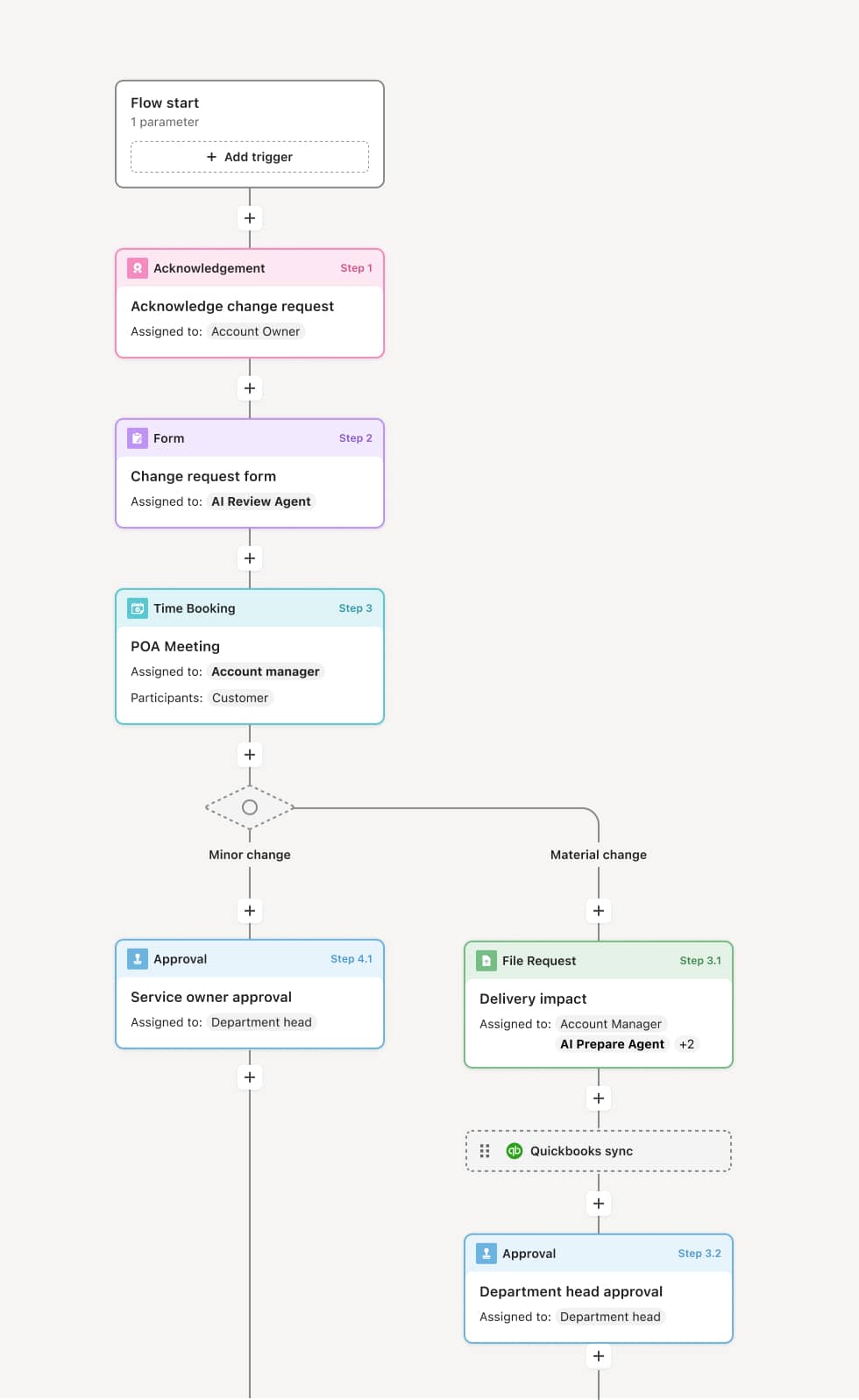
Your version of this process may vary based on roles, systems, data, and approval paths. Moxo’s flow builder can be configured with AI agents, conditional branching, dynamic data references, and sophisticated logic to match how your organization runs this workflow. The steps below illustrate one example.
Work order submission
The process begins when a requestor submits a work order describing the work needed, location, urgency, and any supporting information such as photos, equipment IDs, or prior service history. An AI Agent can assist by classifying the work order by type and priority based on the description and flagging whether it matches a known recurring issue.
Scope and priority assessment
The operations or maintenance manager reviews the work order to confirm the scope, assess the priority level, and determine resource requirements. Emergency or safety-critical work orders may be expedited through a fast-track approval path. Routine work orders are scheduled according to standard timelines.
Budget and cost review
Finance or the budget owner validates that funds are available for the work and that the estimated cost is reasonable for the scope. If the work order exceeds budget thresholds or requires unplanned expenditure, it is escalated for additional authorization. An AI Agent may compare the estimate against historical costs for similar work.
Safety and compliance review
For work requiring permits, confined space entry, hazardous materials handling, or other safety considerations, the safety or compliance team reviews the work order and confirms that required protocols and documentation are in place.
Approval and assignment
The work order is approved and assigned to the appropriate field team, contractor, or maintenance crew with a defined schedule. The assignees receive the full scope, instructions, location details, and any safety requirements.
Execution tracking and closure
As work is completed, the field team updates the work order with completion status, actual costs, and any notes. Upon completion, the work order is closed and the requestor is notified. The full work order record is preserved.
This process commonly relies on inputs such as the work order request, asset or location data, cost estimates, budget allocations, and safety documentation. It may be triggered by a maintenance request, an equipment alert, a tenant or occupant submission, or a scheduled maintenance cycle. Connected systems often include CMMS platforms like Fiix, UpKeep, or Maximo, ERP systems like SAP or NetSuite for cost tracking, and facility management tools for location and asset data.
Key decision points include whether the work order scope is clearly defined and accurately prioritized, whether the estimated cost falls within available budget or requires additional authorization, whether safety or permit requirements must be addressed before work can begin, and whether resources and scheduling align with the requested timeline.
Vague work order descriptions that make it difficult to scope, estimate, or prioritize the work accurately. Budget not validated before work begins, leading to cost overruns discovered after completion. Safety requirements overlooked for work that requires permits or specialized protocols, creating compliance and liability risk. Resource conflicts when multiple work orders compete for the same team or equipment without centralized scheduling visibility. Work orders not closed upon completion, leaving open records that obscure true backlog and completion metrics.
Orchestrates work order approval across requesters, operations managers, finance, safety, and field teams in a single flow that matches the urgency of the work.
Routes work orders based on type, cost, and priority so emergency work is fast-tracked while routine requests follow standard approval timelines.
AI Agents classify and prioritize work orders at submission, flagging recurring issues, estimating costs based on historical data, and identifying safety requirements.
Supports parallel budget and safety reviews so cost validation and compliance checks happen concurrently rather than sequentially.
Connects to CMMS and ERP platforms like Maximo, UpKeep, and SAP so asset data, cost records, and work history flow into the approval process.
Preserves the complete work order record including scope, approvals, execution details, and actual costs for asset management, financial reconciliation, and continuous improvement.