Support operations manager
Customer support team lead
Technical support specialist
Customer success manager
VP of customer experience
Product support engineer

This process is used when a customer support issue cannot be resolved by the initial support tier due to technical complexity, policy constraints, product defects, or customer sensitivity. It applies when resolution requires specialized product knowledge, engineering involvement, management authorization, or cross-team coordination. It is common when first-response agents, tier-two specialists, and product or engineering teams must collaborate to diagnose and resolve the issue within SLA commitments. Ideal for SaaS, technology, telecommunications, financial services, and any organization with tiered customer support operations.
The support escalation process typically involves first-tier support agents who identify and initiate the escalation, escalation coordinators or team leads who triage and route the issue, tier-two or tier-three specialists who provide deeper technical or product investigation, product or engineering contacts who assist with defect-related issues, and customer success managers or account managers who engage on high-value or relationship-sensitive escalations.
Faster resolution of complex support issues by connecting the customer’s problem directly to the specialist best equipped to solve it. Preserved customer context so escalated agents have the full issue history, prior troubleshooting steps, and customer communications without re-investigation. Reduced customer effort because the customer does not need to repeat their issue as it moves between teams. Better SLA adherence through proactive escalation before deadlines are missed rather than reactive escalation after a breach. Clearer escalation patterns that reveal recurring issues, enabling product improvements and support process refinements.
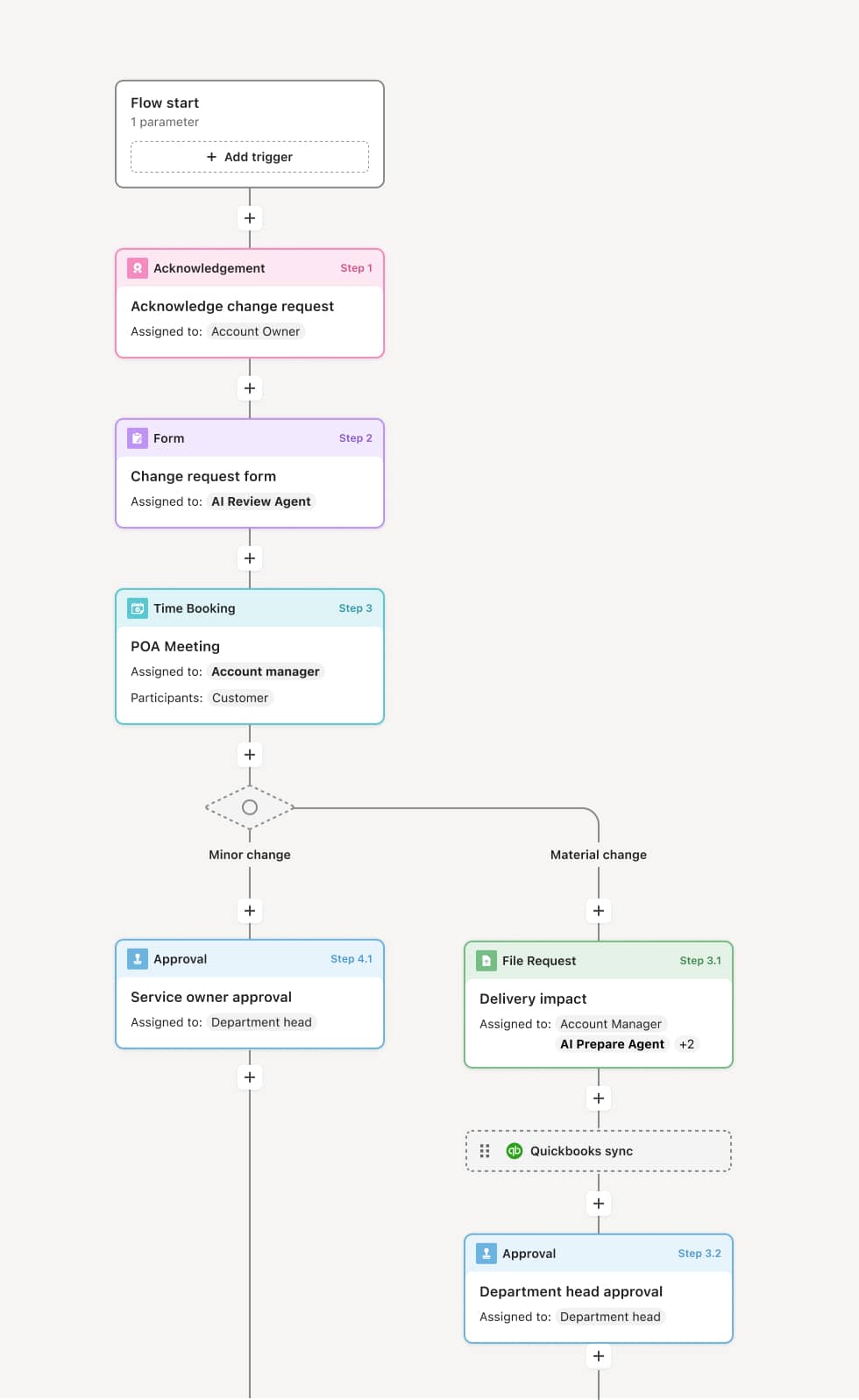
Your version of this process may vary based on roles, systems, data, and approval paths. Moxo’s flow builder can be configured with AI agents, conditional branching, dynamic data references, and sophisticated logic to match how your organization runs this workflow. The steps below illustrate one example.
Escalation trigger
The process begins when a first-tier support agent determines that the issue requires escalation. This may be triggered by technical complexity beyond the agent’s training, an SLA timer approaching its threshold, a customer request for escalation, or a known product issue requiring engineering involvement. An AI Agent can assist by evaluating the issue against escalation criteria and recommending the appropriate escalation tier.
Triage and routing
The escalation coordinator or team lead reviews the issue to confirm the escalation and determines the routing — whether to a tier-two specialist, a product engineer, or a senior account manager. The routing decision considers the issue type, product area, customer priority level, and available specialist capacity.
Specialist investigation
The assigned specialist receives the complete issue context, including the original ticket, customer communications, troubleshooting steps already taken, and relevant system or product data. An AI Agent may prepare a summary highlighting the key diagnostic information and prior resolution attempts. The specialist investigates, may request additional information from the customer, and works toward a resolution.
Resolution and customer communication
Once a resolution is identified, it is communicated to the customer with a clear explanation. If the resolution requires the customer to take action, the process tracks their confirmation. If the initial resolution attempt is unsuccessful, the escalation may be elevated further or returned to the specialist with additional guidance.
Closure and feedback loop
Upon confirmed resolution, the escalation is closed with documented resolution details, root cause, and any follow-up actions. The customer is notified of closure. Escalation data is captured for trend analysis, agent training, and product improvement feedback.
This process commonly relies on inputs such as the original support ticket, customer account data, troubleshooting logs, product configuration details, and SLA status. It may be triggered by an agent’s escalation decision, an SLA timer, or a customer request. Connected systems often include helpdesk platforms like Zendesk, Freshdesk, or Intercom, CRM tools like Salesforce for account context, and product monitoring or logging tools for technical diagnostics.
Key decision points include whether the issue meets escalation criteria based on complexity, SLA risk, or customer impact, which specialist or team is best suited to resolve the issue, whether the proposed resolution adequately addresses the customer’s problem, and whether the issue reveals a product defect or pattern that should be routed to engineering or product management.
Escalations initiated without sufficient diagnostic context, forcing specialists to re-investigate from scratch and extending resolution time. Routing to the wrong specialist team due to incomplete triage, requiring re-routing and further delays. Customer communication gaps during the escalation, leaving the customer uncertain about status and eroding trust. Escalation data not captured in a way that supports trend analysis, causing the same issues to recur without systemic improvement.
Orchestrates escalation across support tiers, specialists, and account teams in a single flow that preserves full issue context at every handoff.
Routes escalations based on issue type, product area, and customer priority so the right specialist is engaged immediately without manual triage delays.
AI Agents prepare escalation summaries with the issue timeline, troubleshooting history, and relevant diagnostic data so specialists can start investigating immediately.
Keeps the customer informed within the workflow so status updates and resolution communications are delivered in context rather than through separate channels.
Connects to helpdesk and CRM platforms like Zendesk, Salesforce, and Freshdesk so ticket data and account context flow directly into the escalation process.
Captures escalation patterns by preserving resolution details, root causes, and timelines as part of the operational record for trend analysis and continuous improvement.