IT security manager
Identity and access management lead
Systems administrator
Compliance officer
HR operations lead
Department manager

This process is used when an employee, contractor, or external stakeholder requests access to a system, application, database, or data set that requires authorization before provisioning. It applies when access requests must be validated against role-based access policies, least-privilege principles, or regulatory requirements such as SOX, HIPAA, or SOC 2. It is common when managers, IT, security, and compliance teams must coordinate to evaluate the request against the user’s role and the sensitivity of the resource. Ideal for technology, financial services, healthcare, government, and any organization with structured identity and access management programs.
The user access approval process typically involves the requester who submits the access request with business justification, the direct manager who confirms the request aligns with the user’s role, IT or IAM teams who evaluate the request against access policies and provision the access, security teams who review requests for sensitive or privileged access, and compliance officers who ensure regulatory alignment for access to controlled data or systems.
Faster access provisioning by routing requests to the right approvers based on resource sensitivity and user role, eliminating delays from unclear approval paths. Consistent policy enforcement so every access grant is validated against role-based access controls and least-privilege principles. Reduced unauthorized access risk through structured review that catches over-provisioning, role conflicts, or requests that exceed business need. Documented access decisions that satisfy audit and compliance requirements with a clear record of who approved, what was granted, and why. Streamlined onboarding and role changes because access requests tied to new hires, transfers, or promotions follow a defined, repeatable process.
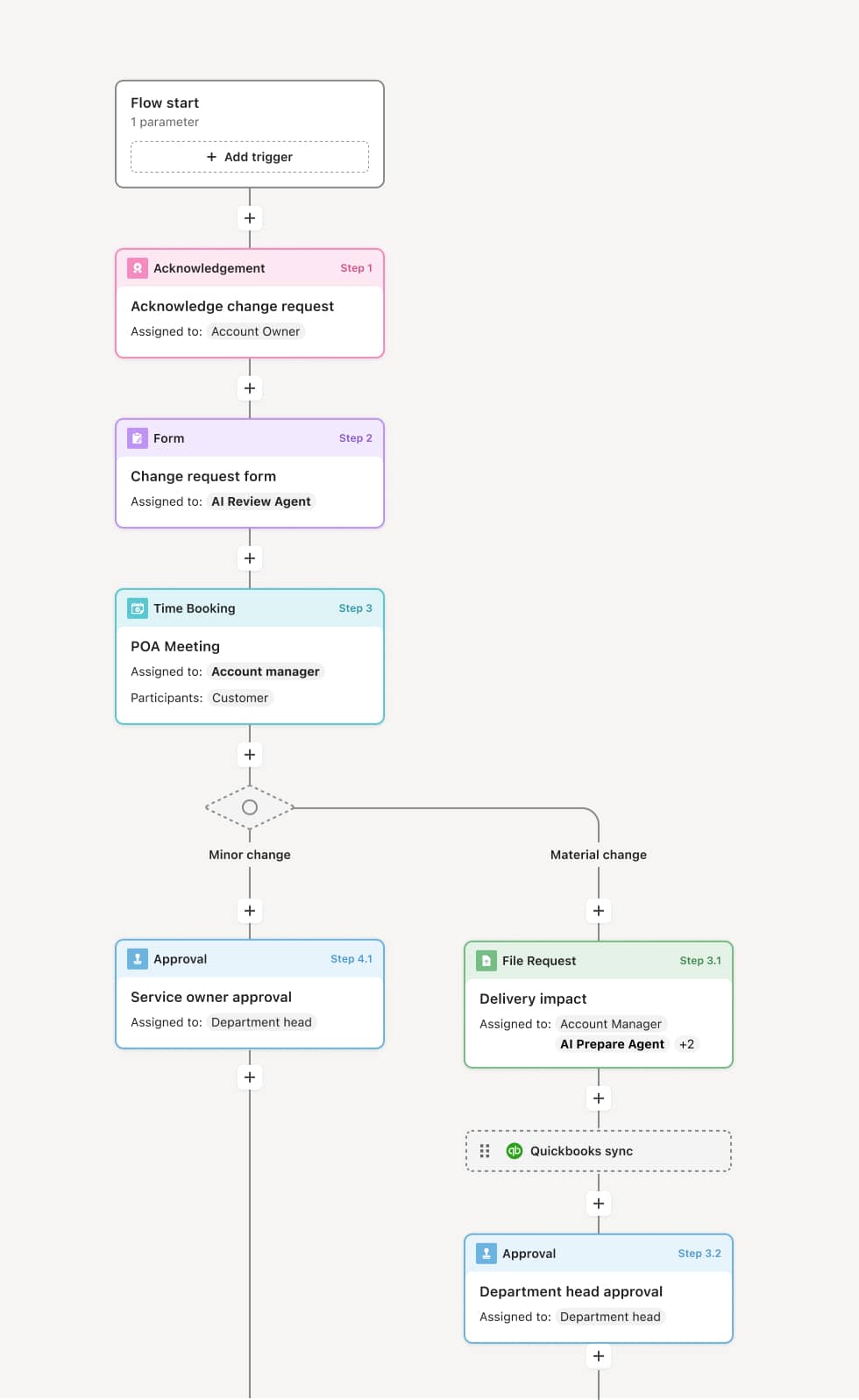
Your version of this process may vary based on roles, systems, data, and approval paths. Moxo’s flow builder can be configured with AI agents, conditional branching, dynamic data references, and sophisticated logic to match how your organization runs this workflow. The steps below illustrate one example.
Access request submission
The process begins when a user or their manager submits an access request specifying the system or resource, the level of access needed, and the business justification. This may be triggered by a new hire onboarding, a role change, a project assignment, or a direct request. An AI Agent can assist by pre-populating the request with the user’s current role, existing access entitlements, and the standard access profile for their position.
Manager validation
The requester’s direct manager reviews the request to confirm that the access aligns with the user’s role and current responsibilities. If the manager determines the access is not justified, the request is returned or declined with an explanation.
Policy and entitlement review
IT or the IAM team evaluates the request against role-based access policies, entitlement catalogs, and separation-of-duties rules. If the requested access conflicts with existing entitlements or violates least-privilege guidelines, the request is flagged for revision or escalation. An AI Agent may check for role conflicts or highlight that the requested access exceeds the standard profile for the user’s position.
Security review for sensitive access
Requests involving privileged access, administrative rights, access to sensitive data, or systems governed by regulatory frameworks are routed to the security team for additional evaluation. This review may include assessment of the user’s security training status, background check completion, or the need for additional access controls such as multi-factor authentication.
Approval decision
The request is routed to the appropriate approver based on the resource sensitivity and access level. Standard access may be approved by IT or the IAM team. Privileged or sensitive access requires security or compliance sign-off. The approver authorizes, authorizes with conditions, or denies the request.
Provisioning and notification
Upon approval, the access is provisioned in the target system. The user and their manager are notified of the granted access, any conditions, and the access review period if applicable. The complete request, approval, and provisioning record is preserved.
Periodic access review
Granted access enters the organization’s periodic access review cycle, where continued business need is reassessed. Access that is no longer justified is revoked.
This process commonly relies on inputs such as the access request form, user role and department data, entitlement catalogs, role-based access policies, and existing access records. It may be triggered by a new hire event in the HRIS, a role change, a project assignment, or a direct request. Connected systems often include identity management platforms like Okta, Azure AD, or SailPoint, HRIS systems like Workday or BambooHR for user data, and ITSM platforms like ServiceNow for request tracking.
Key decision points include whether the requested access aligns with the user’s role and business justification, whether the access conflicts with separation-of-duties rules or least-privilege policies, whether the resource sensitivity triggers additional security or compliance review, and whether conditions such as time-limited access or additional controls should be applied.
Requests submitted without adequate business justification, requiring approvers to seek clarification and delaying provisioning. Over-provisioning when access is granted beyond what the role requires because standard profiles are not defined or enforced. Separation-of-duties conflicts not detected because entitlement checks are manual or incomplete. Orphaned access when users change roles or leave the organization and previously granted access is not revoked. Access review cycles missed, allowing stale entitlements to accumulate and increasing the organization’s risk surface.
Orchestrates access approval across managers, IT, security, and compliance in a single structured flow that moves at the pace of business need.
Routes requests based on resource sensitivity and access level so standard access is provisioned quickly while privileged requests receive appropriate security review.
AI Agents check access requests against role profiles and entitlement policies at submission, flagging conflicts, over-provisioning, or missing justification before the review begins.
Supports conditional approvals with time-limited access, additional authentication requirements, or monitoring conditions tracked within the workflow.
Connects to identity management and HRIS platforms like Okta, SailPoint, and Workday so user data, entitlements, and provisioning actions flow into the process.
Preserves the complete access record including every request, review, approval condition, and provisioning action for audit, compliance, and periodic access review.