



Table of Contents
Putting your logo on a portal is the easy part. The harder part shows up a few weeks after launch, when requests sit unanswered in the branded inbox, approvals still happen over email, and your team is back to chasing clients for the same documents. The portal looks like yours, but the work around it still runs on follow-ups and spreadsheets.
That gap is why operations leaders now judge white label client portal software on two things at once: how completely it carries their brand, and how well it moves multi-party work to done. Branding builds trust, but execution keeps clients coming back. This guide explains what white label portals are, why businesses use them, and how five options compare on branding depth, workflow, security, and fit.
Key takeaways
Full white labeling goes past the logo: It covers custom domains, branded email, and sometimes branded mobile apps, so clients never see the provider.
Execution matters as much as branding: The portals that keep clients engaged also define who owns each step, route approvals, and cut manual follow-up.
Simple needs suit lighter tools: Assembly (formerly Copilot) pairs a CRM with a branded portal, Zendo focuses on agency service delivery, SuiteDash bundles CRM and billing, and Clinked focuses on secure documents.
Complex, multi-party work needs structure: When processes span teams and outside parties with approvals and exceptions, choose a platform built to run the whole process.
Top 5 white label client portal software compared
This table compares the five platforms on the factors operations teams ask about most.
| Feature | Moxo | Assembly | SuiteDash | Clinked | Zendo |
|---|---|---|---|---|---|
| Workflow automation | Process-driven, with AI agents | Workflow builder | Built-in workflows | Kanban boards, tasks, Zapier | Custom workflows and automations |
| Security and compliance | SOC 2 Type II, SOC 3, GDPR tools | SOC 2 Type II, GDPR | GDPR, HIPAA-capable with a BAA | ISO 27001, GDPR | Two-factor login, GDPR |
| White-label depth | Full portal on desktop and mobile web, plus iOS and Android SDKs | Branded portal on your domain | Web plus mobile app | Portal plus mobile app | Domain, email, per-client themes |
| Target market | Operations teams of any size or industry | SMBs, agencies | SMBs, agencies | SMBs, security-focused firms | Agencies, freelancers |
| Setup | Guided setup with forward-deployed engineers | Ready-made apps and AI app builder | 25+ native toolkits | Simple setup | 240 ready-made themes |
Why client portal chaos is real (and expensive)
Your clients are drowning in email chains. Documents get lost between Slack, Dropbox, and their inbox. Important approvals sit buried for days because nobody knows who is responsible for what.
Microsoft WorkLab found that workers receive 117 emails a day on average, which is why client requests get buried.
This is more than frustrating. Every lost file and stalled approval erodes the trust clients place in your brand, and trust is what keeps them working with you.
White label client portal software solves this by centralizing everything under your brand. You give clients one branded place to share, approve, and track work. If you are new to the category, start with our guide to what a client portal is.
What is white label client portal software
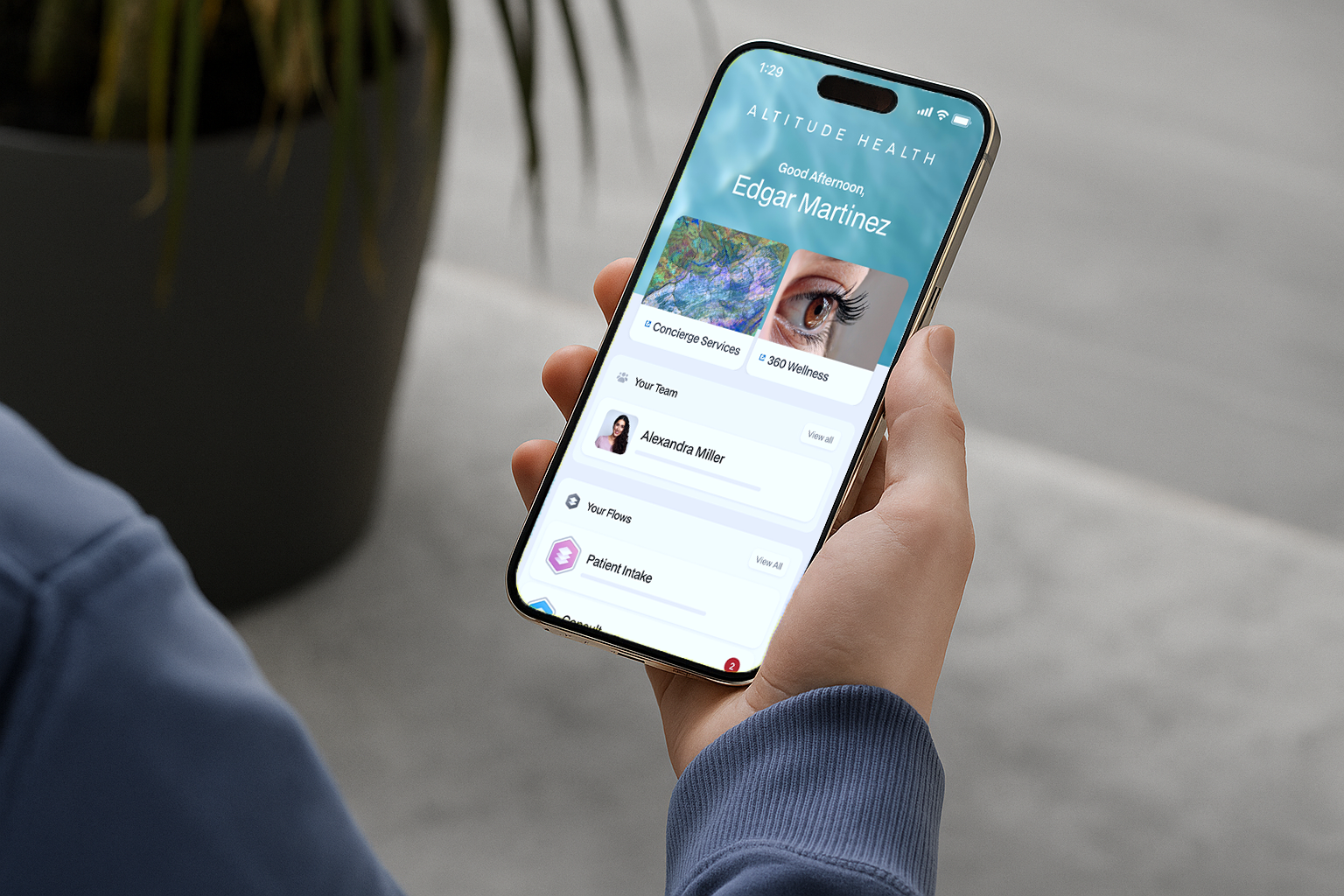
Think of it as putting your brand on a finished product. Your clients see your logo, colors, domain name, and messaging throughout their experience, and never the underlying platform provider.
Custom branding: Upload your logo, set brand colors, and customize themes to match your visual identity.
Custom domains: Present clients.yourcompany.com instead of yourcompany.platformname.com for consistent brand continuity.
Mobile app branding: On some platforms, your company name also appears in app stores with your full branding package.
Email customization: Notifications come from your domain using your templates and tone.
For a step-by-step walkthrough, see how to set up a white label client portal.
Why businesses need white label client portals
Trust and professionalism matter more than ever. When clients experience consistent, professional branding throughout their journey, they gain confidence in your organization and are more likely to keep working with you. A branded portal also replaces scattered email, which is a security gain, as our comparison of client portals and email security explains.
In Edelman's 2026 brand trust report, 88% of people said trusting the brand is an important or critical purchase criterion.
5 best white label client portal software
1. Moxo
Moxo runs the business operations behind a white label client portal through human-AI orchestration, so the work clients start there gets finished without the chase.
Who owns what: Approvals, exceptions, and decisions stay with named people. AI agents prepare requests, validate what clients submit, and follow up when something stalls.
Branding that goes all the way: A branded client portal on your own domain, email templates in your voice, and secure links or portal sign-in from desktop and mobile web browsers, with nothing to download.
Built into your stack: APIs, SDKs, and embedding let developers place portal functions inside your existing systems.
Security and governance: Each step is recorded in an audit trail, backed by SOC 2 Type II, SOC 3, and GDPR tools.
Best use cases: multi-step client processes with several stakeholders, regulated work needing a clear record, and companies that want full brand control, including iOS and Android SDKs for embedding Moxo in their own app.
Who it isn't for: independent consultants and tiny shops whose only need is file sharing with a logo on top.
See your onboarding or approval process running under your own brand while agents chase the missing pieces. Book a demo
2. Assembly (formerly Copilot): solid choice for small agencies
Best for: Small firms that want a CRM, a branded client portal, and ready-made apps in one place.
Assembly pairs a CRM with a branded client portal where clients message your team, share files, sign contracts, and pay. It adds a workflow builder, an API and MCP server, and SOC 2 Type II certification.
What to check:
Mobile: Its site describes a branded web portal on your domain, so confirm mobile needs in a demo.
Process depth: Tasks, trackers, and a workflow builder are included; test them on your most complex client process.
Security: SOC 2 Type II certified, with HIPAA, GDPR, and CCPA support listed on its security page.
Integrations: An API and MCP server, plus QuickBooks and Xero invoice sync.
Best use cases: Small firms that want client messaging, files, contracts, and payments under their brand, without complex multi-party approval workflows.
3. SuiteDash: all-in-one business toolkit
Best for: Small businesses that want CRM, projects, billing, and a white label portal in one bundle.
SuiteDash bundles 25+ native toolkits, including CRM, projects, invoicing, file exchange, and secure messaging, under your brand. It adds automations and an installable branded mobile experience.
What to check:
Automation: Automations move work across connected tools; test multi-step approvals before you commit.
White label: Brands the client workspace and an installable mobile experience.
Compliance: SuiteDash is HIPAA-capable and needs a BAA before handling PHI.
Breadth: With many tools in one bundle, check that the ones you rely on go deep enough.
Best use cases: Agencies and small service firms that want one bundle for clients, projects, and billing.
4. Clinked: security-first collaboration
Best for: Professional services and financial firms handling sensitive client data.
Clinked is a white label client portal with ISO 27001 certification, GDPR support, and branding for workspaces, your own domain, email notifications, and mobile access. It covers file sharing, tasks, Kanban boards, and client messaging.
What to check:
Workflow: Kanban boards and task management are built in, and Zapier connects other apps; test multi-step approvals.
Mobile: A mobile app gives clients access, so confirm how far its branding goes.
Approvals: Check how approval chains and automated client journeys would run.
Best use cases: Accounting, financial, legal, and consulting firms that need secure document sharing under their own brand.
5. Zendo: white label portal for service businesses
Best for: Agencies, freelancers, and service businesses that run requests and deliverables through a branded portal.
Zendo is a white label client portal for service delivery, with custom workflows on lists and Kanban boards, client messaging, file sharing, quotes, and invoices. It offers 240 ready-made themes, a custom domain, and branded email.
What to check:
Plan features: Custom domains, branded email, and automations sit on higher plans, so confirm what your plan includes.
Security: Two-factor login, secure messaging, and GDPR compliance are listed; confirm audit needs in a demo.
Integrations: Zapier and app embeds connect other tools; check deeper integration needs.
Best use cases: Agencies and service businesses with repeatable request and delivery workflows.
Where white labeling stops
White labeling usually covers the branded space clients log into: the logo, colors, and domain. Login emails, app store listings, help docs, and invoices often still show the vendor's name.
Ask each vendor which of those surfaces you can brand, and which ones stay theirs. That is also the practical difference between white label and private label: private label goes further, with more of the product appearing as your own.
Off-the-shelf portal, custom build, or AI portal builder
An off-the-shelf white label portal is fastest when your process is already clear. A custom build gives you more control, and it takes longer to ship and longer to change.
Some tools now let you describe a process, or upload an SOP, and get a portal flow back. Use that path when you want to start from how the work already runs, then adjust the steps.
How to choose the right white label client portal solution
For complex, multi-party processes: Moxo, for workflow automation, deep white-labeling, and governance across teams and outside parties.
For basic agency needs: Assembly pairs a CRM with a branded client portal and ready-made apps. For agency-specific options, see our list of client portals for marketing agencies.
For an all-in-one bundle: SuiteDash bundles CRM, projects, billing, and a white label portal.
For simple security and compliance: Clinked offers security features and ISO certification for standard document sharing.
For agency service delivery: Zendo runs requests, deliverables, and invoices through a branded portal.
What to evaluate
Mobile experience: Does it provide native mobile apps with your branding, or only mobile-responsive web portals?
Workflow depth: Can the platform handle your real business processes, or only basic task management?
Integration capabilities: Can it work with your existing systems, or does it require you to change how you operate?
Security and compliance: Does it meet your industry requirements for data protection and audit trails?
Scalability: Will it grow with your business, or will you need to switch platforms as you expand?
Per-client branding: If you serve multiple brands or practices, check whether you can set a separate theme for each client.
Our checklist of client portal features goes deeper on each of these.
Common pain points solved
Email chaos: Centralize important client communications instead of losing them in overflowing inboxes.
Version control nightmares: End the "which version is final?" confusion with centralized documents and clear approval workflows.
Approval bottlenecks: Stop delays caused by approval requests buried in email threads.
Security concerns: Meet compliance requirements with audit trails and secure access controls.
Client drop-offs: Reduce abandoned projects with transparent progress tracking and automated reminders.
Business benefits
Client retention: Branded experiences feel more professional and trustworthy, which builds longer relationships.
Operational efficiency: Centralized workflows reduce manual coordination and free your team for higher-value work.
Scalability: Handle more clients without adding staff at the same rate, through automated processes and clear workflows.
Risk reduction: Secure processes reduce compliance risk and potential liability.
Competitive advantage: Stand out with consistent, branded client experiences.
ROI and results
The return from a white label client portal shows up in a few measurable places. Track them before and after launch so the gains come from your own numbers.
Email volume: Count client emails per project before and after you move communication into the portal.
Cycle time: Measure how long onboarding, approvals, or document collection take from request to completion.
Administrative effort: Log the hours your team spends chasing documents, sending reminders, and updating clients.
Client satisfaction: Survey clients on clarity and ease at the end of each engagement.
If portals are part of a wider client communication stack, our roundup of customer communication platforms compares the other tools involved.
Choosing the best white label client portal for your business
If you need basic document sharing with simple branding, a lighter tool may cover you for now. Once clients, teams, and approvals start crossing in the same process, branding alone won't keep work moving. Choose for the process you will be running in a year.
Moxo fits teams at that stage, carrying your brand across desktop and mobile web while agents and named owners move each client request through to done.
Brand one live client process in Moxo and invite a few clients to use it. Request free trial
FAQs
What's the difference between white label and private label client portals?
White label solutions remove the provider's branding and let you add your own logo, colors, and basic customization. Private label goes deeper, covering the full user experience, mobile apps, domain structure, and sometimes API responses. Check how far each vendor's customization reaches, since many stop at logos and colors.
Can white label client portals integrate with existing business systems?
Integration capabilities vary between platforms. Assembly offers an API and MCP server, plus QuickBooks and Xero invoice sync. SuiteDash includes built-in business tools that reduce integration needs. Moxo provides APIs, SDKs, webhooks, and embedding options, so portal functions can sit inside the systems you already run.
How long does it take to set up a white label client portal?
It depends on the platform and how much you customize. Simple portals with logo and color changes can go live quickly. Portals with custom domains, branded mobile apps, integrations, and multi-step workflows take longer, because each process needs to be mapped and tested with real users first.
What security features should I look for in white label client portals?
The baseline should include SSL encryption for all data in transit, multi-factor authentication, regular security audits and compliance certifications, granular user permissions and access controls, and audit trails for regulatory compliance. For regulated industries, also ask where data is stored and who can see AI outputs.